All your sites
Which of your sites needs you today, before you open a single one
Eleven sites is eleven browser tabs, opened one at a time, to learn that nine of them did nothing. This screen is the other order of operations: every property you have connected on one row each, four combined totals above them, and a number on the rows where something is waiting. Each site is measured against its own freshest day of data rather than against a shared calendar, so a property whose sync is a day behind reads as a full window instead of as a collapse.

How it works
Four cards, and each one adds up every site you have
Above the table, four cards roll the whole account into one line: combined clicks as an exact figure, combined impressions abbreviated in thousands, an average position weighted by impressions rather than averaged flat, and the count of unseen alerts across every project you can open.
The weighting is the part that earns its keep: every project's position multiplied by its impressions, summed, then divided by the impressions, so a site with 400 impressions does not pull the number as hard as one with 400,000. Each card carries its change against the previous period, and where that period held none of the metric the chip reads “new” rather than a confident 0.0%.
The Alerts card carries no percentage at all, because a count of things nobody has read yet has no comparison worth drawing; it is captioned “unseen: open the flagged projects” or “nothing unseen”, and it takes on its alert colouring only while the number is not zero. The strip appears from the second project onwards, because one project rolled up is that project.

Each site is judged against its own freshest day
Pick Last 28 days and every site gets its own 28 days rather than one shared calendar window. For each project the window ends on that project's own newest stored day and runs back 28 days from there, and its baseline is the 28 days immediately before that. Search Console publishes two to three days late, on a lag that is not the same for every property, so a shared end date would measure one site over 28 days and its neighbour over 25, then print the missing three as a fall.
A second rule sits under the comparison: both sides have to cover the same number of days or no percentage is drawn at all. That is what keeps Last 16 months from measuring its 487 days against the 17 that happen to precede them. Before that rule existed, the same preset measured 480 days against 17 and reported growth of nearly four thousand per cent on a site whose clicks were falling.
A custom range whose end runs past what a project holds keeps your start date, is pulled back to the last day that project actually has, re-derives the baseline from the span that was really measured, and names that day beside the range button.
Eight columns, and a word for the state of every site
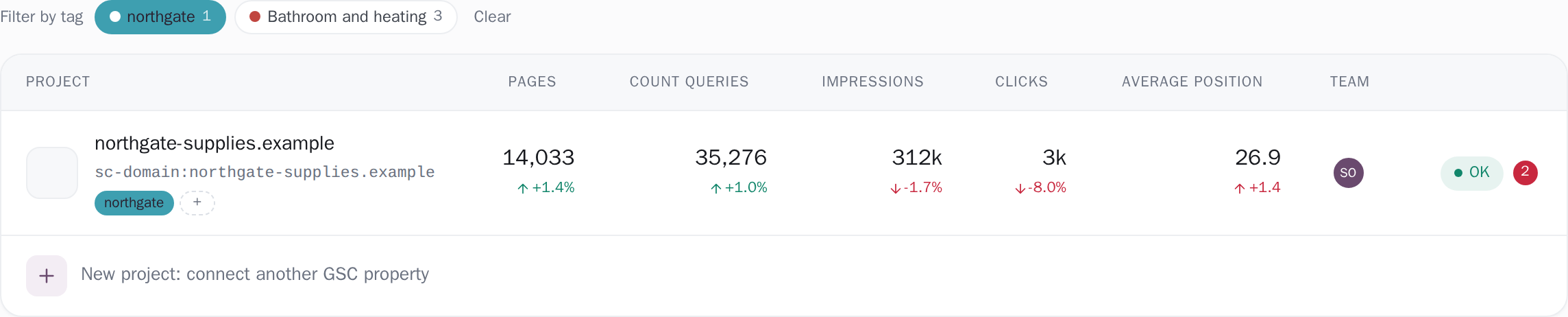
One row per property: its favicon, its name, the Search Console property string underneath, its tags, then pages, count queries, impressions, clicks, average position, the people on it and its state. Seven of the eight columns sort, text A to Z and numbers biggest first, with a stable tie-break on the name so equal rows keep a fixed order, and your choice is remembered in this browser.
Search matches the project name, the property string and the site's own host, and returns you to the first page, because a search that matches three projects while you are on page four shows an empty table. The state is a word rather than a colour: OK, Syncing, Sync failed, and Not in Search Console, which has three distinct causes behind it, and hovering the badge names which of the three is yours. Beside it sits the unseen-alert count as a plain number, and the team column stacks up to four initials and then a count of the rest.
One badge, three causes, three different fixes
Hover the badge on a row and it names the cause that applies. Until that is cleared the project is paused and does not sync.
-
Verification lost
Search Console still lists the property, but the connected Google account is no longer verified as its owner. The usual reason is a DNS change or a lapsed domain registration that took the ownership record with it.
What clears itRe-verify the property in Search Console. The nightly check then asks Search Console again and resumes the project once the property can be read.
-
Property replaced
The property we were reading is gone from that account, and another property for the same site is still there, for example a Domain property where there used to be a URL-prefix one.
What clears itOpen the project: its alert names the property that is still there. Add the original back in Search Console and the nightly check resumes this project, or connect the other one with New project, as a project with its own separate history.
-
Domain gone from that account
The connected Google account's Search Console no longer lists the property at all.
What clears itAdd the property back to that account's Search Console. The nightly check resumes the project once the property is listed and verified again.
Tags are your own filing of the list
A tag belongs to you rather than to the project, and the database is what enforces it: every query is scoped by your user id as well as by the tag id, so two people who share a site can each file it their own way, and one account's tags never surface in another's. Name a tag anything up to 40 characters, colour it with one of twelve swatches or with any six-digit hex you like, and the chip works out its own text colour instead of assuming one: it computes real gamma-corrected luminance and takes whichever of white or near-black actually contrasts better, because white on #FF6B35 reaches 2.8:1 where near-black reaches 5.4:1.
The bar above the table shows every tag with how many projects carry it, and picking two narrows the list to the sites carrying both, which is how retainer and report due become one list. Rename or recolour a tag and every copy of it on the page follows in the same moment. A project holds up to 20 tags, and every write goes to the server, which re-checks ownership and drops any id you do not own rather than taking the browser's word for it.
Which window, and which half of Google's data
The window is the range button on this screen: 7 days, 28 days, 3 months, 6 months, 16 months, all history, or two dates you pick. Clicks, impressions and average position are read from each project's stored daily series and are exact inside that window. A preset window is anchored per project, ending on that project's own newest stored day and running back the same number of days, because Search Console publishes two to three days late and not on the same lag for every property.
The comparison is the equally long stretch immediately before it, and it is drawn only where the archive covers all of that stretch; elsewhere the chip reads “new” instead of a percentage, and hovering it gives the one sentence this screen has for that state: “The previous period had none of this, so there is no percentage to compute.” Pages and Count queries are measured differently and the screen says so: Search Console serves those two counts for 7, 28 or 90 days, the sync stores exactly those three windows with their prior periods, and this screen reads the one nearest your range, snapping to 90 for anything 90 days or longer.
Whenever that window differs from the range you picked, the cell carries a marker naming the window, such as 28d, and a line under the table says so in words. Average position is how far down the results a site sat, averaged across every time it was shown, so the searches shown most often count for most, and its change is in places gained, previous minus current.
The thresholds, stated
[page] count and a [query] count, 25,000 rows a request up to 250,000, advancing by the rows actually received so a short page cannot end a count early and publish its floor as a total.#RRGGBB with twelve quick swatches offered, a project carries up to 20 tags, and new tags are accepted at 30 a minute. The chip's ink is decided by measurement: white over that colour against near-black over that colour, higher contrast wins.Exactly what you are looking at
- The four cards describe the account, and the rows are a page of it. They are computed from every project the range request returned, which is every site you own plus every site somebody has shared with you, and they stay that way whichever 25 rows are on screen. Paging changes the list and never the totals, so “across 11 projects · vs previous period” is a measured count rather than a label.
- Two columns keep their own window, and the screen prints it. Clicks, impressions and average position follow your range exactly, from the daily series; Pages and Count queries read the stored window nearest to it. Pick a 20-day custom range, for instance, and those two cells wear a 28d marker while a line under the table reads “Pages and Queries are measured over the last 28 days, not the selected range. Search Console serves those two counts for 7, 28 or 90 days only.” Where a project has not yet re-synced with those windows stored, the Pages cell shows the all-time roster instead, and its tooltip says which of the two you are reading.
- A number appears where it can be right, and a word appears where a word is the honest answer. A percentage is drawn only where the archive holds a prior window of exactly the same length; otherwise the chip reads “new” rather than a number. The 28-day figures the sync wrote are painted instantly only when the range you left behind IS those 28 days, so a three-month label never sits over a 28-day number. And if the range request fails, a message says “Couldn't load numbers for this range, so we show none rather than the wrong window”, so the failure is named rather than passed over in silence.
- This screen is where you choose, and the files come out of what you chose. It is built to be read in one pass and acted on: a row opens that project's dashboard, and the downloads live inside the project, where a report knows its own window and writes it into the file's own header rows. The query file, for instance, states the window it covers and the share of the property's clicks that window accounts for, which is a sentence only a project-scoped report is in a position to write. That route streams at up to 10 files a minute.
Connect your site and see the first answer today
Sign in with Google, pick a property, and your dashboard fills in while you watch, with the screen counting the days as they land.