Why did my Google traffic drop?
Traffic is down and the dashboard is one falling line. Almost everyone starts guessing at this point: an algorithm update, a competitor, something they changed. Guessing is expensive. Here is the order that actually narrows it down, and you can do all of it in Search Console for free.
Last updated 2026-09-04 · The Clode team · Guides
The short version
Confirm the drop is real and not just a short week or missing days. Check whether impressions fell (fewer people saw you) or CTR fell (they saw you and did not click) or position fell (you moved down the page). Those are three different problems. Then find out whether it is the whole site or one section, because a site-wide drop and a one-section drop have almost no causes in common.
First: is it actually a drop?
Search Console data lags two to three days, and the most recent day or two is always incomplete. If you are looking at a chart that ends yesterday, the cliff at the right-hand edge is not a drop. It is data that has not arrived.
Compare complete periods of equal length, and make sure they contain the same days of the week. Search traffic has a strong weekly rhythm for most sites; a period with five Mondays compared against one with four will show a "drop" that is nothing but the calendar.
Second: which number moved?
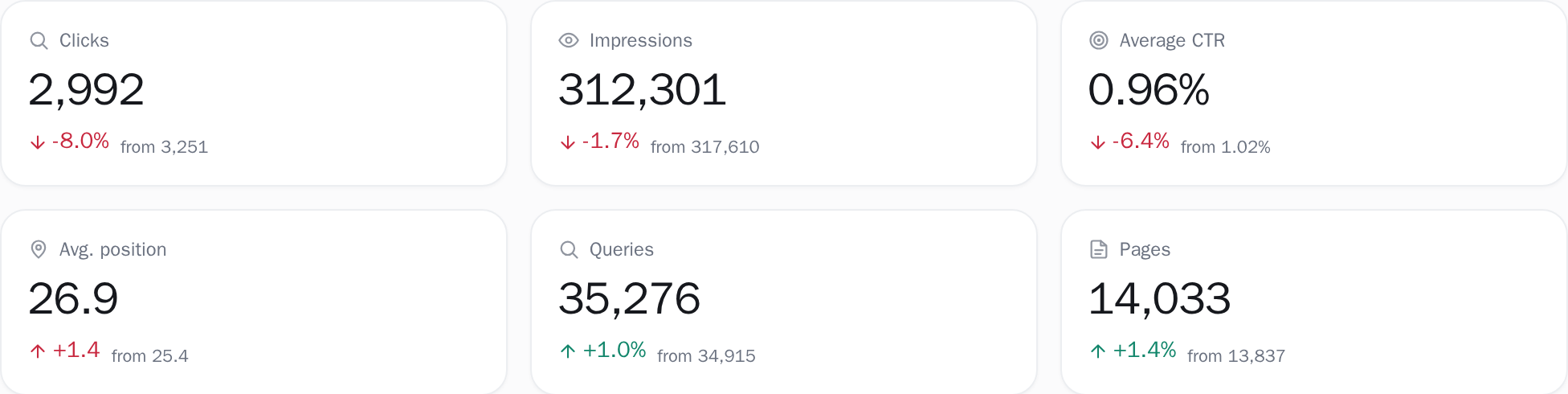
Clicks are impressions multiplied by CTR, and CTR mostly follows position, so three numbers can move them, and it matters enormously which one changed.
Impressions fell.
Fewer people saw you at all. Either demand dropped (seasonal, or the topic cooled) or you stopped appearing for searches you used to appear for.
Position fell.
You still appear, but further down. Something outranked you, or Google reassessed the page.
CTR fell while position held.
People saw you in the same place and clicked less. Usually the results page changed around you: an AI summary, more ads, a competitor with a better title.
Look at all three before forming a theory. A theory built on clicks alone is a coin flip.
Third: is it everything, or one part?
This is the question that separates a five-minute diagnosis from a two-week one, and it is the one Search Console makes hardest, because it reports a single site total.
Break the site into its real parts (service pages, blog, category pages, each language) and look at each one's clicks separately. In practice one of two shapes appears. Everything fell by roughly the same proportion, which points at something site-wide: a technical change, a manual action, a broad algorithm update, a domain-level problem. Or one section fell while the others held, which points at that section: pages changed, a template broke, a competitor moved in on that topic, or those specific pages were reassessed.
You can do this by exporting pages and sorting them by URL folder in a spreadsheet. It is tedious, and it is the single most useful half hour available to you.
How this works in Clode
Winners & losers takes the page-by-page half of this off your hands. It ranks your pages by the clicks each one gained or lost against a previous period of exactly the same length, so you can see at once whether the losers share one folder or are spread across the whole site.
Fourth: rule out the boring explanations
Before reaching for anything sophisticated, check the things that are common and dull.
A page or section stopped being shown.
An accidental
noindex, a robots.txt rule, a redirect someone added. Compare the list of pages getting impressions now against a month ago; anything that vanished entirely is a technical problem, not an SEO one.Seasonality.
Compare against the same month last year rather than last month. If you cannot, because Search Console has deleted it, that is its own lesson.
Brand versus non-brand.
If people searching your name dropped, that is a marketing or PR change, not a search ranking one. Mixing the two hides both, so split brand from non-brand before reading either.
A single huge page.
On many sites one page is a large share of all traffic. Its personal bad month reads as a sitewide decline.
Only then: algorithm updates
An update is a reasonable explanation once the others are excluded, and a terrible first guess. Check whether the fall lines up with a confirmed update date, and whether it was gradual or overnight. Algorithm effects usually roll out over days and hit some kinds of page harder than others; a vertical cliff on one date is much more often something you or your host did.
If it is an update, the useful response is not a fix but a reading: which pages lost, what they have in common, and what the pages that gained have instead.
What we do about this
Every step above is doable by hand, and it is genuinely free. We would rather you knew that. The reason people do not do it is that steps three and four take an afternoon of exporting and pivoting every time.
Clode does that part automatically: your site is split into groups from its own URL structure, each group's change is calculated against a like-for-like previous period, and pages that stopped being shown are listed for you. It also runs four week-over-week checks after every sync and tells you when one crosses its threshold, so the diagnosis starts in week one rather than after the month closes.
The checklist
Work down it in order, and tick a step off once its test is done.