Small business owners
You built the website. Now find out if it's working.
If you made your own site (with a builder, with AI, over a few evenings), you have probably opened Google Search Console once, seen four numbers and a graph, and never gone back. This is that same data, written out in sentences.
Clicks are down 10.5%: 2,995 against 3,348 in the period before.Biggest losses: led downlights, sealant, dimmable led downlights. Open Changes for the full list.
The first lines of the dashboard, as the product writes them.

The real question is not "what is my CTR".
It is "why is nobody calling". So the first screen answers that one: how many people saw your site in Google, how many clicked, what they had typed, and whether that is better or worse than last month.
Winners & losersWords get explained where they are used.
An impression is your site appearing in someone's search results. Position 8 means you were eighth on the page, so most people never scrolled to you. We write that out rather than assuming you know it, every time it appears.
You will not have to remember what to look at.
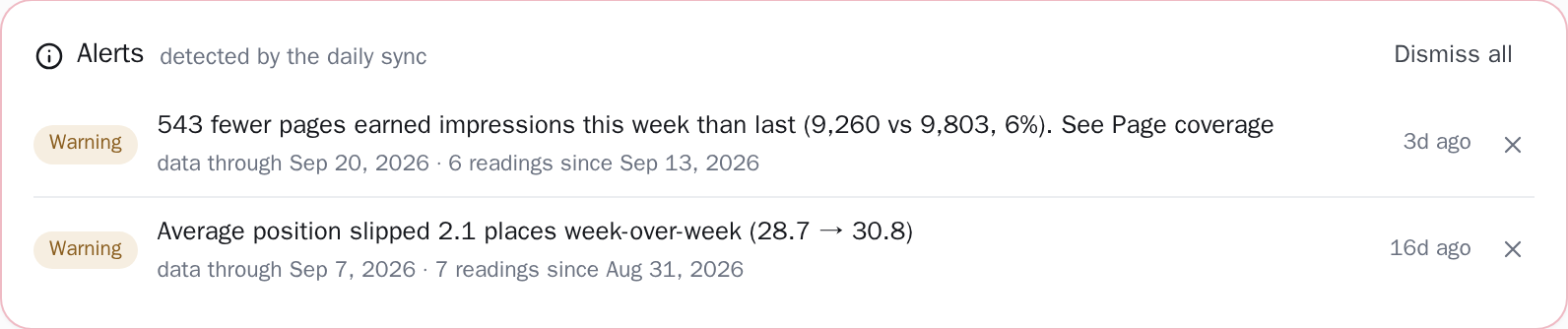
Four checks run at the end of every sync, and when one of them crosses its threshold it leaves a sentence on your dashboard: "Clicks down 31% week-over-week (from 1,240 to 856)". You still have to open the dashboard, because nothing is emailed. Each check has a floor, and on a small site that matters: the clicks check only runs once the week before had at least 20 clicks, and it speaks up at a fall of a quarter or more, so a drop from four clicks to one stays quiet.
Drop alertsNothing to install on your site.
No plugin, no code to paste, nothing that can break what you built. We read the data Google has already collected. If your site is in Search Console, you are two clicks from done. If it is not, that takes ten minutes and is worth doing whatever you decide about us.
What you will know by tomorrow morning
- Which of your pages people actually find in Google
- What they typed to get there: the real words, not guesses
- Pages Google has stopped showing, which is usually something you can fix
- Alerts when something moves, in plain sentences, on screen and on both plans
One site is free, with no card. If it does not tell you anything useful in the first ten minutes, close the tab.
Related guides
What this measures, and where another tool owns the answer
This measures one thing exactly: what Google has already recorded about your site. A site nobody has searched for yet has nothing recorded, so the first move is pages and links, and these screens become worth reading the day the searches start. It measures up to your front door: how often you appeared in Google, and how often someone clicked.
Whether that person then phoned, booked or bought is answered by your phone, your booking system or your till, and the answer is theirs to give. It names problems and leaves the writing, the fixing and the diagnosis to you: keyword research and a competitor's rankings are a research tool's job, and why a page moved is a judgement someone makes with the page open. Alerts live inside the app, on the project's dashboard and as a count on the projects list, so they are waiting for you the next time you sign in.
Other teams reading the same data
Connect your site and see the first answer today
Sign in with Google, pick a property, and your dashboard fills in while you watch, with the screen counting the days as they land.