Rank movement
How many searches climbed, how many slipped, and from where
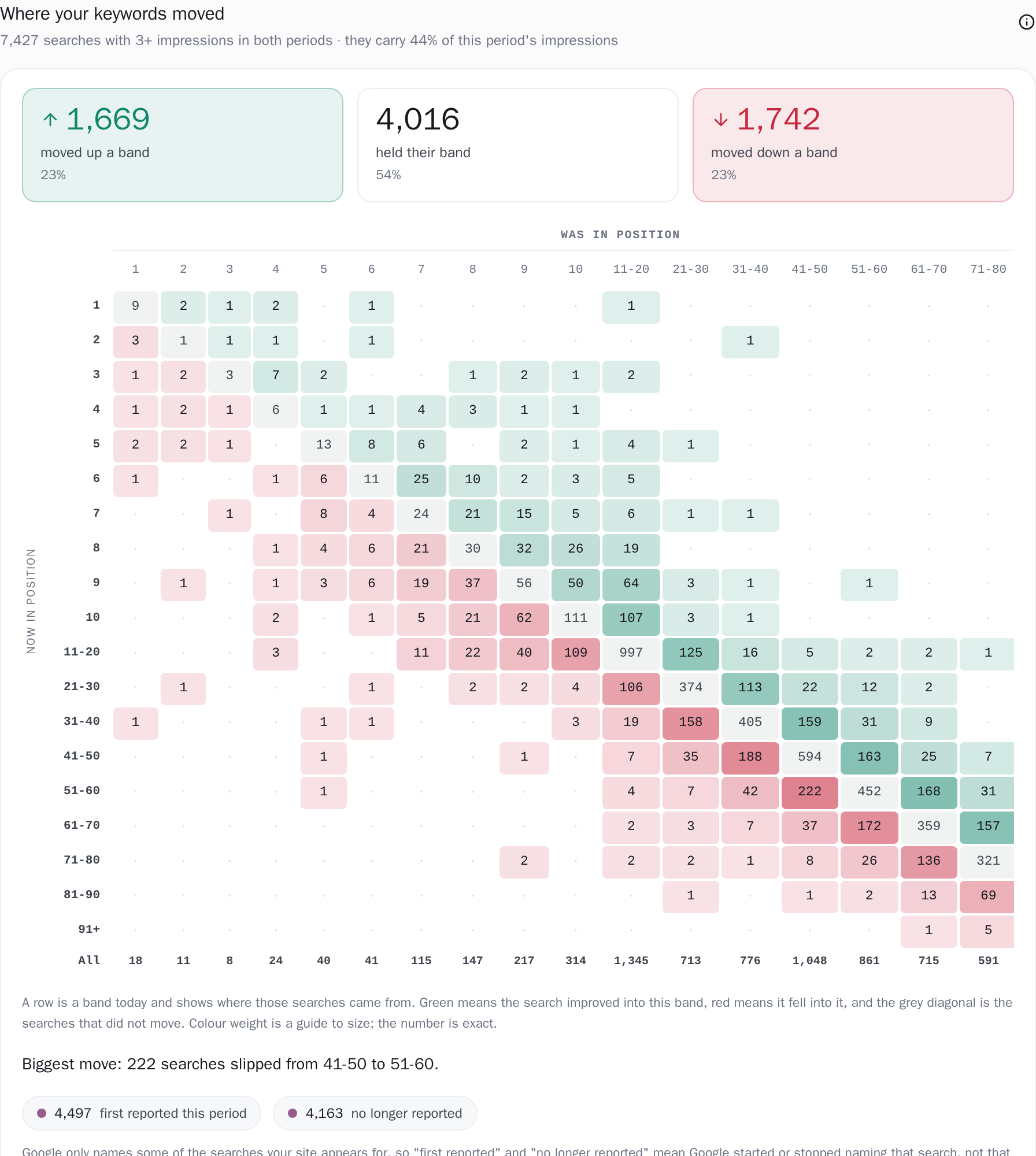
A position band that goes from 690 searches to 705 is equally consistent with nothing moving and with 400 searches arriving while 385 left, and a standing distribution cannot tell you which of the two happened. So this card draws the movement itself, over the one population where movement has a meaning: the searches Google named in both periods with at least 3 impressions on each side: 7,467 of them on the site we develop against, carrying 44% of this period's impressions. Each gets a position band then and now, every pair is counted, and the grid prints where they came from. Climbed, held, slipped, with the exact number in every cell.
- 1,669 moved up a band · 23%
- 4,016 held their band · 54%
- 1,742 moved down a band · 23%
Counted on the card below: 7,427 searches with 3+ impressions in both periods.
How it works
A grid, so you can see where they came from
Rows are where a search sits now, columns where it sat before, so a row reads: these are the ones in position 4 today, and here is where they came from. That orientation carries the colour. A cell to the right of the diagonal came from a worse band and is green, a cell to the left fell into this band and is red, and the grey diagonal is the searches that held.
The two margins are different measurements, and the axes are titled to say so: now in position down the rows, was in position across the columns. The row total is how many searches are in that band now, the column total how many were in it before. Colour weight is scaled against the largest cell off the diagonal, so the shape of the movement is visible at a glance while every cell still prints its exact count, and an empty pair prints a dot rather than a nought so it cannot carry the visual weight of a measured count.
Above the grid, three counts over one denominator: moved up a band, held their band, moved down a band. Below it, one sentence you can repeat without the picture, always an off-diagonal cell, with ties going to the bigger jump and then to the worse outcome so the grid and the sentence name the same move.
Nineteen bands, and the edges are printed beside the numbers
Resolution is a real choice with a real consequence, and the consequence is printed rather than absorbed: measured over 28-day windows on the site we develop against, 85% of the same searches held their band on four bands and 55% held it on twelve. Position 4 to position 5 is a move here where a coarser split calls it stillness. Nothing about the site changes between those readings, only the boundaries, which is why the whole list of bands and their edges sits under the grid next to the counts, and why a screenshot of this card always carries the rule it was drawn under.
A band is defined once, and that single definition is generated into both the database query and the browser, so a boundary means the same thing in the grid as in the labels.

The one population where movement has a meaning
A search is in the grid when Google named it in both periods with at least 3 impressions on each side. Everything else is counted too, in its own two chips under the grid: first reported this period for a search Google named now and not before, no longer reported for one it named before and not now, the first carrying, on hover, the share of this period's impressions it brought with it. The sentence under those chips is what keeps them readable: Google names some of the searches your site appears for, so those two are about Google's naming, and a search that crosses the 3-impression gate in one period and sits under it in the other lands there as well, which is why they run larger than a list of genuinely new searches. The gated counts are printed for both windows, because a search held under the gate in the earlier one arrives in the later one looking new.

Any range, any baseline, from rows already stored
The block follows the date range in the header and the baseline you set beside it: the previous period, the same period last year, or a custom pair of dates. It can do that because the daily rows carry the impression-weighted numerator, so a band over any window is one sum over rows already held rather than a fresh question put to Search Console.
A pill appears only when one of the two periods was shortened to the days keyword history covers, and the tooltip beside it states the two periods that were actually compared, to the day, unless it has a day at Google's row ceiling to report instead. A baseline that starts before that history comes back with the dates you picked and the day the history starts, a range that falls outside it entirely comes back with the span the history covers, and a range so long that no equal period fits before it says that too, so you can move whichever of the two you meant to move.

Which window, and which half of Google's data
The window is the date range in the header, and the baseline is the equal-length period immediately before it unless you set another one beside it: the same period last year, or a custom pair of dates. Both are measured day by day over the days themselves. A search's band is its impression-weighted average position across the window, sum(posw) / sum(impressions) over the stored daily rows, where posw is the same impression-weighted numerator Search Console builds its own average position from, so the figure for a range you invent is the figure Google reports for that range.
Both windows are then clamped to the days keyword history actually covers; a pill appears beside the title only when that clamp shortened one of the two periods, and the tooltip next to it names the two periods that were compared instead. Choose a baseline that starts before keyword history does and the card names your own dates back to you together with the day that history starts; ask for a range that sits outside it entirely and it names the span the history covers, so you can move whichever of the two you meant to move.
Inside those windows the compared set is the searches Google named in both, with at least 3 impressions on each side, and the subtitle prints how many that is and what share of this period's impressions they carry. That share is measured against your property's own daily totals for the same days rather than against the sum of the rows this store happens to hold.
Days that reached Google's per-day ceiling of 5,000 rows are flagged for each period on its own, and when the comparison spans one the tooltip says how many such days there were and that the counts under it are a floor.
The thresholds, stated
1, 2, 3, 4, 5, 6, 7, 8, 9, 10, 20, 30, 40, 50, 60, 70, 80, 90. A search's band is the count of edges strictly below its position, which puts positions 1 to 10 each in a band of their own, then 11-20 and each ten up to 81-90, and everything past 90 in 91+. That last band is open-ended, so a search at position 140 and one at 400 land in it together.Exactly what you are looking at
-
A band is an impression-weighted average position over every day in the window. A search that sat at 3 for twenty days and at 30 for one lands in the band its impressions put it in, which is the same rule Search Console uses for the average position it reports to you. The daily rows store that weighting as a numerator, so
sum(posw) / sum(impressions)over any set of days reproduces Google's own figure for exactly those days. That is what lets the grid be drawn for exactly the range you asked for. - Days that reached Google's own per-day ceiling are counted and named. A single-day pull on the query dimension returns at most 5,000 rows, measured rather than assumed: 149 of the 529 days on the site we develop against sit at exactly 5,000, with a smooth distribution immediately below, which no natural distribution produces. Each day's own count is measured as it is pulled, and a day that comes back at the ceiling is flagged in the stored history. The flag is kept for each period on its own, so when the comparison spans such a day the tooltip says how many days that was, and a line under the grid says one of the two periods hit the limit of what Search Console will return and that the counts are a floor.
- The share the named searches account for is measured against your property's own totals. The line under the grid prints what portion of this period's impressions and clicks the searches Google named actually carry, and that denominator comes from the independent daily pull on the date dimension for the same days. Taking it from the same sampled rows would make the share look better the more Google withheld, and the difference between those two denominators is the difference between “your keywords lost traffic” and “Google named fewer of them”.
- The share the named searches account for is measured against your property's own totals. The line under the grid prints what portion of this period's impressions and clicks the searches Google named actually carry, and that denominator comes from the independent daily pull on the date dimension for the same days. Taking it from the same sampled rows would make the share look better the more Google withheld, and the difference between those two denominators is the difference between “your keywords lost traffic” and “Google named fewer of them”.
Connect your site and see the first answer today
Sign in with Google, pick a property, and your dashboard fills in while you watch, with the screen counting the days as they land.