Pivot analytics
“I need these numbers cut a completely different way.”
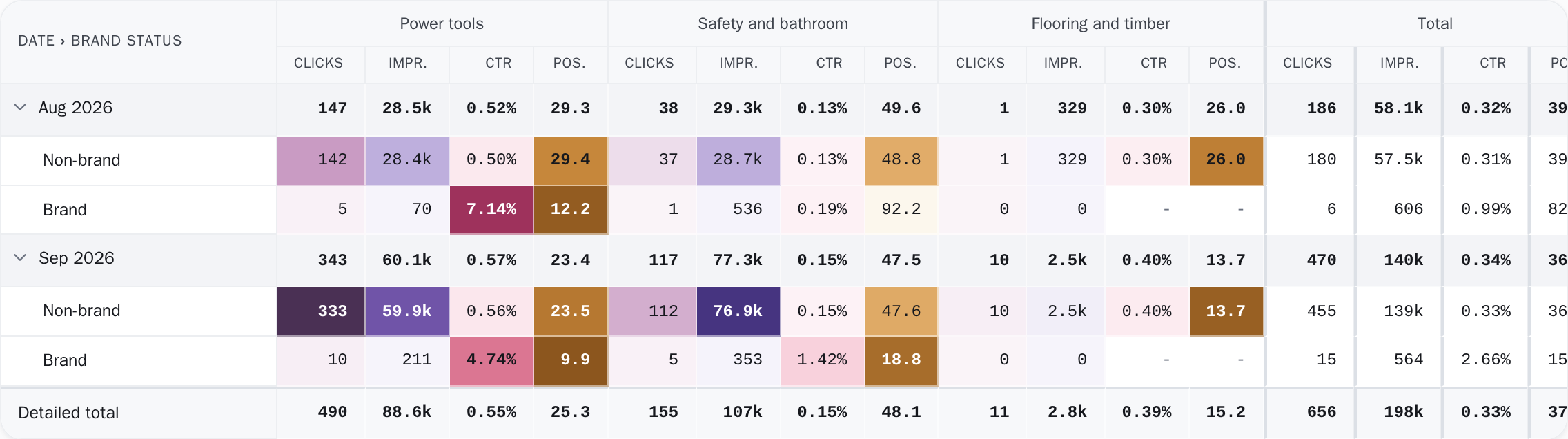
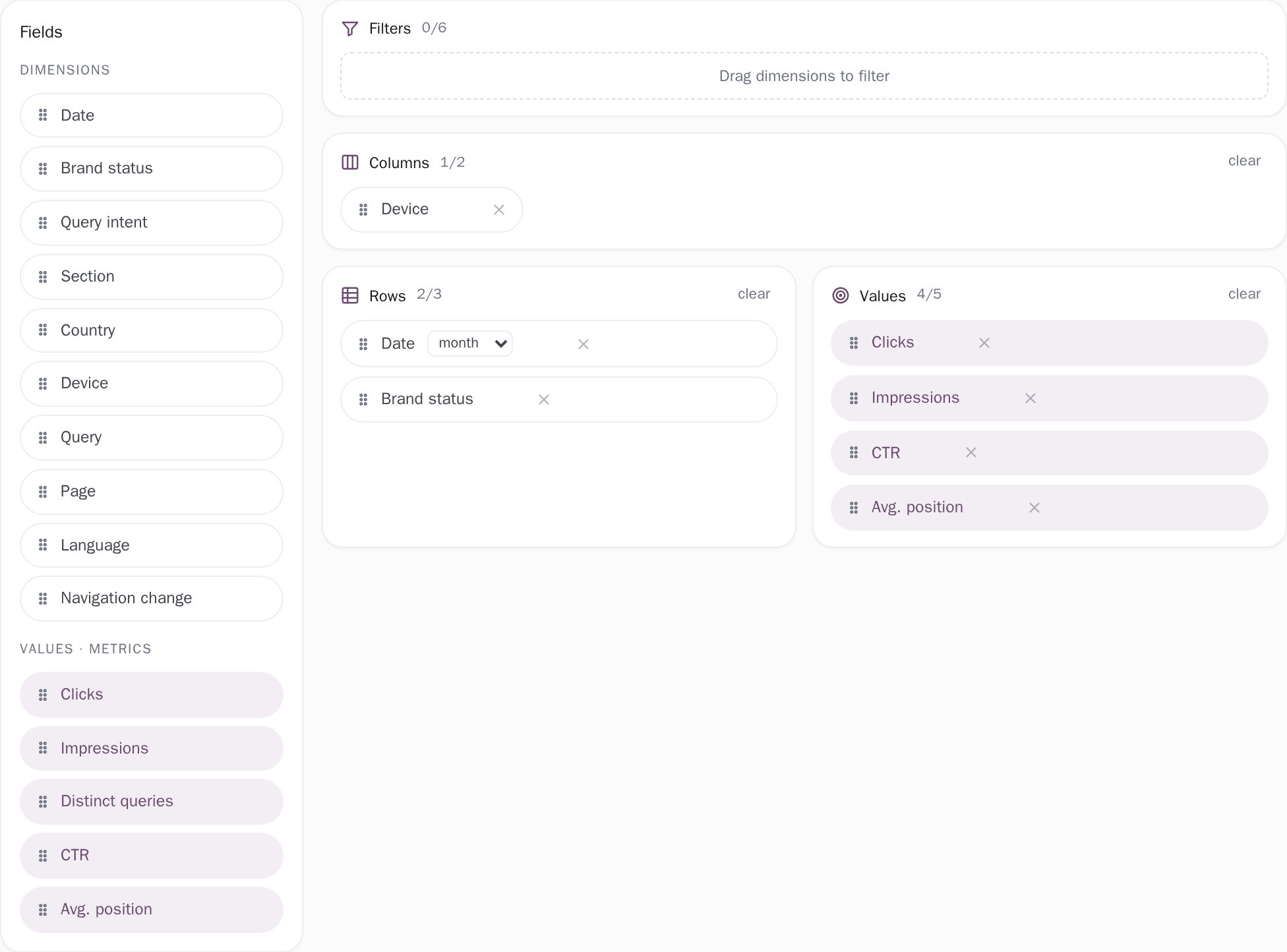
Set it up however you want, and read the movement off one screen.
Learn more
Where you'll find it: Analytics
Analyse your Search Console data across all your projects, simply. React quickly to a rise or a drop. Keep the pages and keywords that matter under watch, and their movement in view.
Built for everyone from small business owners to large SEO teams.
Clear, fast analysis that shows what is happening to your site from several angles, so the call you make next is the right one.
Set it up however you want, and read the movement off one screen.
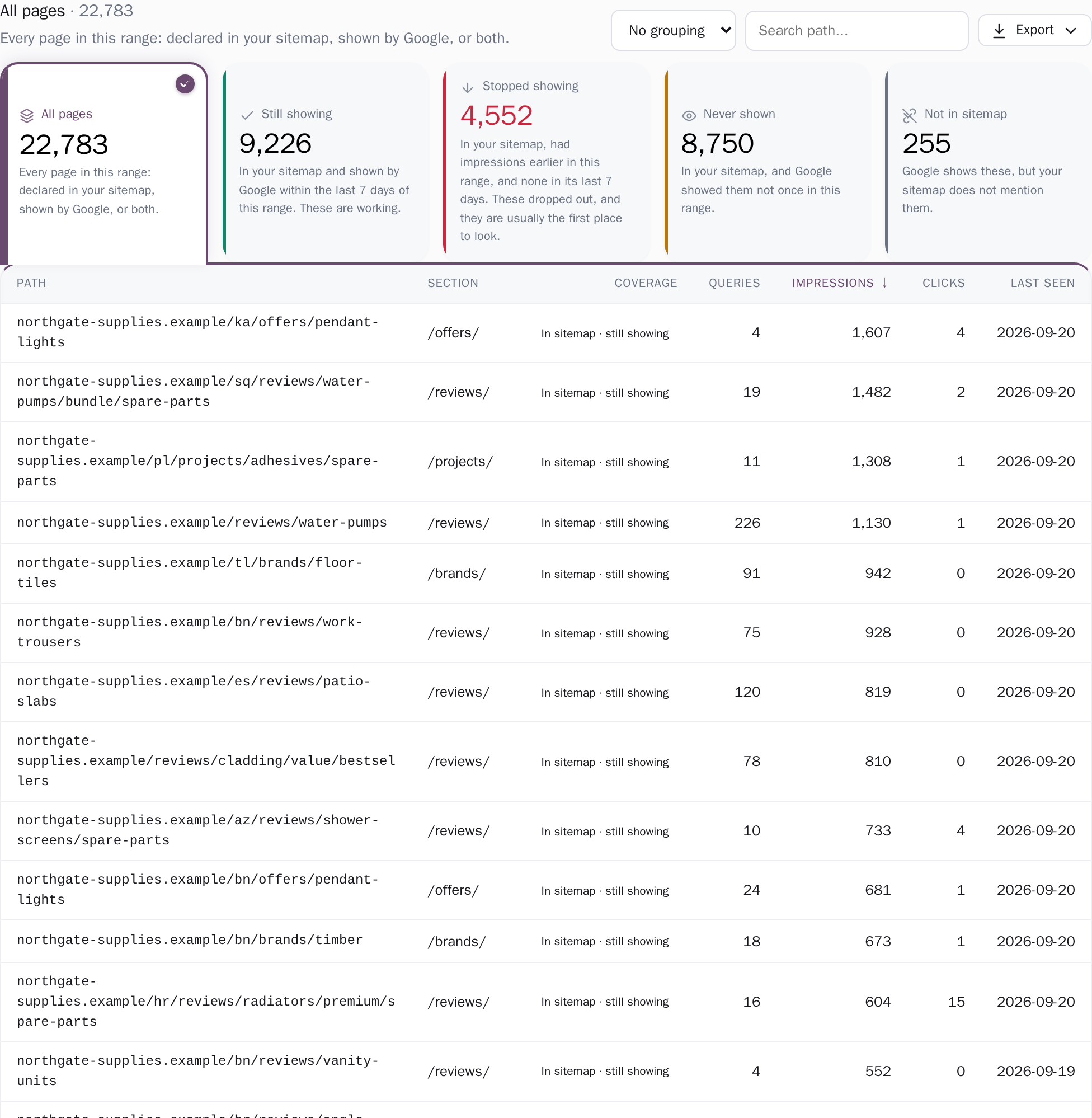
Reconcile your sitemap against what Search Console actually served.
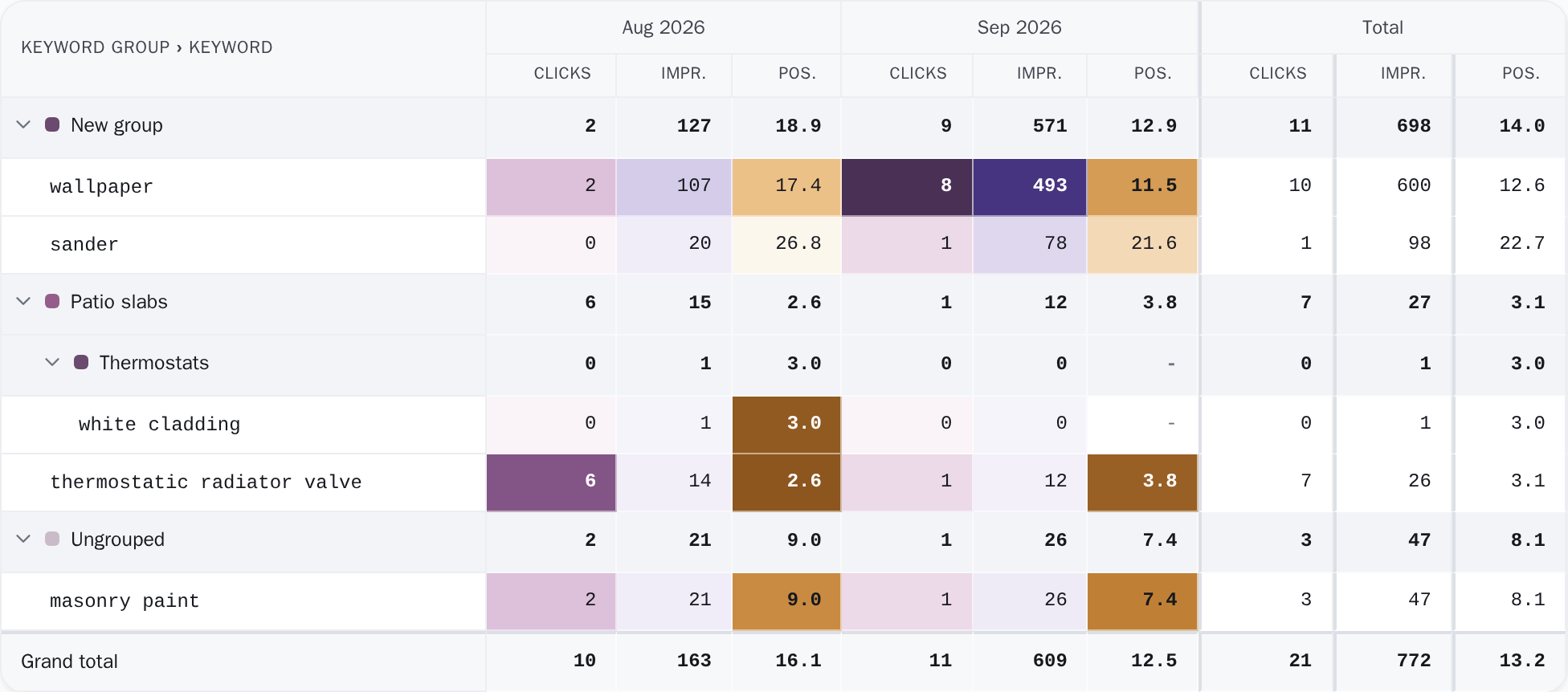
Upload your own keyword list and analyse what it actually did.

The searches your own pages split, ranked by the impressions landing on the wrong one.
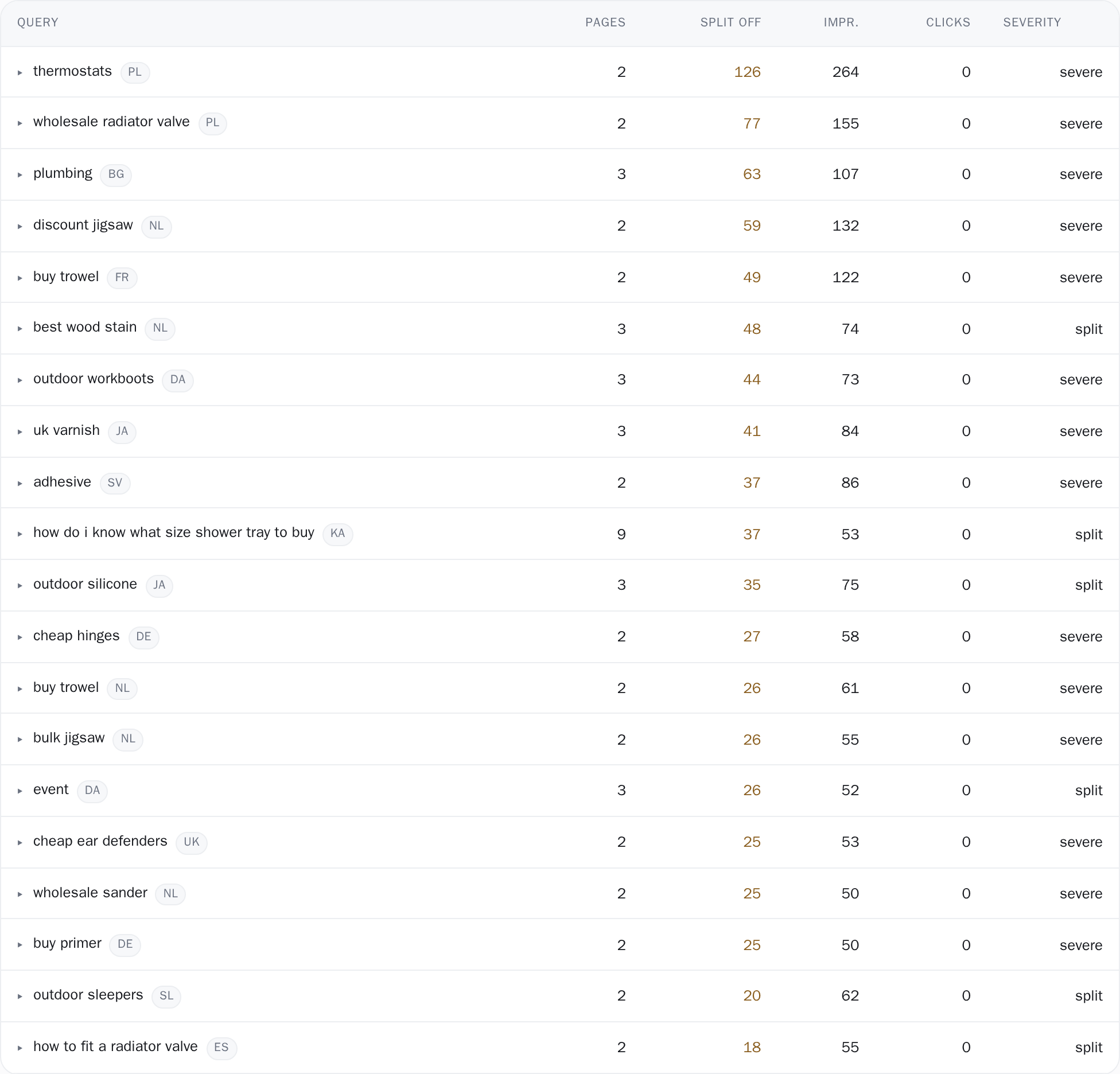
Each has a page naming what it measures and how to read every figure on it.
See every featureNothing to install, no tag to paste, no crawler walking your pages. If you can open Search Console, you can do this.
Google's own consent screen, read-only. Pick a property and the first sync starts.
About a minute
We group your pages by the folders in your own URLs, so services, blog and locations each carry their own numbers before you set anything up.
Automatic
One sync a day, then what rose, what fell, and what two of your pages are fighting over.
Every day, automatically
Not in Search Console yet? Adding your site there is free and takes about ten minutes. How to set it up
We read your data from Search Console and add to it. Here are the two side by side, row by row.
| Search Console | Clode | |
|---|---|---|
| Your data | ||
| History | ~16 months, then deleted | 24 months, rolling |
| Queries | 1,000 rows on screen | Every query Google names, no 1,000-row cap |
| Export | CSV, 1,000 rows | CSV of every row; Excel to 200,000 |
| Your sites | One property at a time | All of them on one screen |
| Reading it | ||
| Pivot tables | Not available | Eight dimensions, rows by columns |
| Groups | Not available | By folder, rule or regex |
| Page coverage | Not available | Every URL, in four groups |
| Target keywords | Not available | Your list, scored over 90 days |
| What changed | ||
| Winners and losers | Not available | Ranked by clicks and position |
| Rank movement | One average position | Nineteen position bands |
| Cannibalization | Not available | Ranked by impressions split off the best page |
| Drop alerts | You go and look | Four checks after every sync |
| Access and price | ||
| Team | Per property, in Google | Unlimited seats, free |
| Price | Free | One site free; paid is €10 a site a month, cheaper per site from 3 sites |
Search Console hands you a total. Clode takes the same numbers apart. Drag the handle and watch one line become two.
In Search ConsoleThe blog is growing and the pages that sell are sliding. The total hides both.
In Clode · GroupingsA grouping built from your own URL sections, read as clicks per group, this period against the last. The line that is falling has a name.
In Search ConsoleIndexed is not the same as shown. Search Console answers the first question and stops.
In Clode · Page coveragePage coverage reconciles your sitemap against what Google actually served and puts every URL in one of four groups. Never shown is a count, not a feeling.
In Search ConsoleIt never appeared in a report, because the site total did not move.
In Clode · Page coverageStopped showing is its own group, with the day it went quiet and that page's impressions drawn day by day from zero.
In Search ConsoleGoogle picks one, changes its mind, and both underperform.
In Clode · CannibalizationFound, ranked by how many impressions land off the best page, with the page holding the most named as the one to keep.
In Search ConsoleThe export cap is not a sample of your traffic, it is the top of it.
In Clode · QueriesEvery query stored is sorted on the server across all of them, not across the first thousand of an export.
In Search ConsoleTwenty keywords out of the top three and twenty into the top twenty average out to nothing.
In Clode · Rank movementNineteen position bands, and how many keywords moved between them, with the band edges printed beside the counts.
In Search ConsoleGoogle serves a rolling window and deletes the oldest day as it moves.
In Clode · Any date rangeWhat it still holds is copied on the day you connect, then kept for 24 rolling months. This November against the November before it.
In Search ConsolePeople who already know you are covering for the people who do not.
In Clode · GroupingsBrand against the rest is built on the first sync, and every report can be read either way.
In Search ConsoleNothing tells you. You have to go and look, on the day it matters.
In Clode · Drop alertsFour checks at the end of every sync, each with a volume floor under it, said in a sentence on the dashboard.
In Search ConsoleOne property at a time, and no way to total them.
In Clode · ProjectsEvery connected property on one row, with totals computed across the account and each site measured against its own freshest day.
Drag left or right anywhere on the chart
Search ConsoleClode
Illustrative figures throughout. Not a real account.
It is free, and the numbers in it are the only first-party record of how you show up in Google. But it was built to report, not to explain. These three gaps are where people give up.
Rows come out a thousand at a time, so telling your service pages from the blog means one filtered view per folder or a pivot you build yourself.
Nobody opens Search Console every morning. By the time a drop is obvious it has been running for a month and you have lost the clicks for good.
Google deletes everything older than about 16 months, one day at a time, and serves the rest a thousand rows at a time. Comparing this March with last March, page by page, means two exports and a spreadsheet. The month before that is already gone for good.
Both of those are true of the same 28 days on the same property. A site total is a sum over everything you have, so it can rise on pages that were never the point while the ones that were give ground quietly.
One number cannot tell you which happened. The split is not a harder question, it is a different question asked of the same rows, and every screen here is built to answer the second one.
Nothing on that line is wrong. It is a sum, and it is accurate.
Together the whole set went 881 to 896, flat, while the site added 2,091 clicks somewhere else.
Measured on the property these screenshots come from: the 28 days to 5 May 2026, against the 28 before. The pages counted are the ones with at least 20 clicks in the earlier window.
An electrician wants to know which of his pages people find. An agency wants to know which of sixty sites to open this morning. Each page below starts from its own question, says what it shows you, and ends with what it measures and which tool owns the rest.
You built the site yourself, maybe with AI. Now you want to know whether anyone is finding it.
Small business ownersYou know what to do with the data. You are tired of exporting it into a spreadsheet to get at it.
SEO specialistsFive client sites or sixty: the per-site rate falls as you add them, the account bill stops at €129, and a client login is free.
Agencies and freelancersOne site, years of posts, and an update that moved everything. Which posts fell, and which are one rewrite from coming back.
Bloggers and publishersA few thousand product pages, and nothing in your store admin tells you which ones Google has never shown to anybody. That is the gap this closes.
Online storesTwenty properties or a hundred, and nobody opens them one at a time. One table for the whole roster, and the sites Google has quietly stopped showing.
PBN ownersThe free plan covers your whole site for 14 days. Every page, every search, nothing sampled, synced every day. Paying changes three things: more than one site, 24 months of history instead of 14 days, and as many saved reports as you need.
1 site · 14 days of history · synced daily
a month; cheaper per site from 3 sites · 24 months of history
however many sites you add
The free plan is real and stays free. The prices above include VAT, and you can move to the paid plan from inside the app whenever one site is not enough.
Google drops your data at about 16 months, one day at a time. We copy what is left the moment you connect, then hold a rolling 24 months in full daily detail. That is about eight months past the point where Google has dropped it.