Every query Google names
Every query Google will name, and what it holds back
You know roughly what people type to find you. What you cannot see is the other several thousand things they type: the specific ones, like "emergency electrician sunday" rather than "electrician", which are the searches that bring someone ready to call. Those sit below the line most tools draw, and nobody tells you how much of your traffic is below it.
Google names the searches behind 21% of one site’s clicks
Measured on the Queries screen against that property’s own daily totals for the same 28 days, 2026-08-05 to 2026-09-01. Count impressions instead of clicks and the named share is 60%: one window, measured two ways.
- Queries Google names, in your list: 21% of clicks60% of impressions
- The rest: searches Google anonymizes, and rows past the 5,000-row cap: 79% of clicks40% of impressions
149 of 529 days hit the 5,000-row ceiling
Google caps a single day’s query pull at 5,000 rows. On one 529-day archive, each day that came back sitting exactly on 5,000 holds its 5,000 highest-clicking queries and no more.
- Days on exactly 5,000 rows: 149
- Days under the ceiling: 380
these account for ~21% of clicks and ~60% of impressions from 2026-08-05 to 2026-09-01; the rest belongs to queries Google anonymizes
How it works
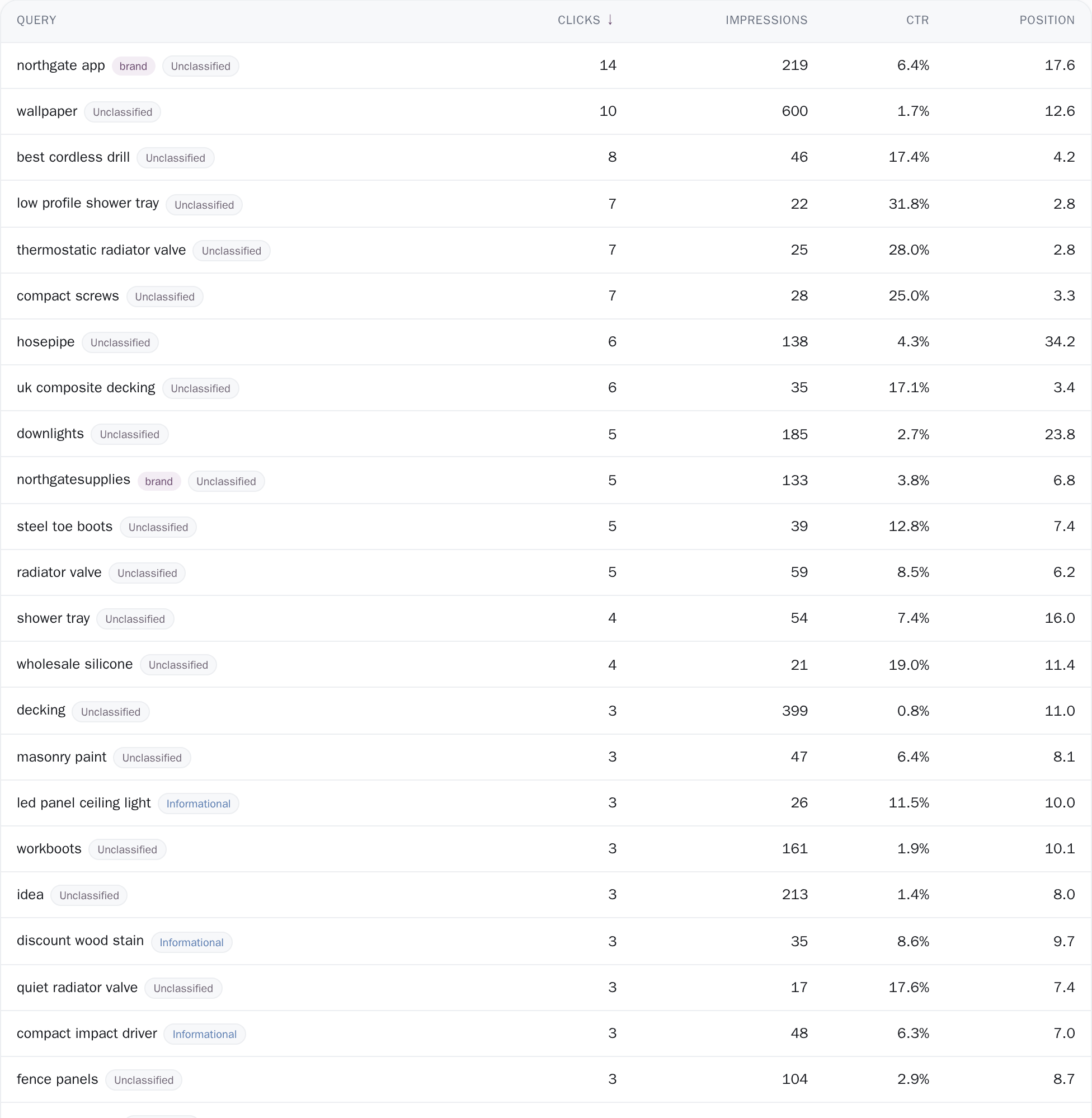
Every stored row, sorted on the server
The table holds every query in your stored per-day pull for the window you picked, fifty rows at a time. That store is built one day at a time, and Google caps a single-day query pull at 5,000 rows, so on your busiest days the list is the 5,000 highest-clicking queries it served that day rather than literally every one. The page keeps what Search Console gave it and does not invent the remainder.
Sorting is done on the server, so clicking Clicks or Position reorders the entire set rather than shuffling the fifty rows on screen. The line above it reads Showing 50 of your real total, and that total comes out of the same filter that produced the rows, so the count and the list cannot disagree. Numbers are printed in full, never rounded to "34.4k", because a table people sort by is a table people read exact figures off.

Intent and brand, with the rule behind each label
Every query the classifier has seen carries a label for what the searcher seemed to want: Transactional, Commercial, Navigational, Informational, Entity or Unclassified. The labels are worked out once per sync over a trailing 90 days, so a query that was only active before those 90 days shows no chip at all and counts as Non-brand.
On a six-month or all-history window that is most of the list. On the unsegmented list, hovering a label tells you which rule produced it, in plain words: "Classified from the words in the query", "Classified from the landing page URL", "Looks like a keyboard mash", "No evidence found, not classified". There is no catch-all bucket. A query written in a script the classifier cannot read (Bengali, Greek, Georgian, CJK) is never run through the English words at all, because a confident wrong label is worse than an admitted blank.
Brand and Non-brand chips sit beside the intent ones, since people googling your name were coming anyway; brand here is the middle label of your domain and its dotted forms, so a trading name that does not appear in your domain reads as Non-brand until you add it to the Brand vs Non-brand grouping, which does take your own terms. Chip counts are worked out ignoring the chip's own filter, so picking one intent does not collapse its neighbours to zero.

Open a keyword and watch four numbers move
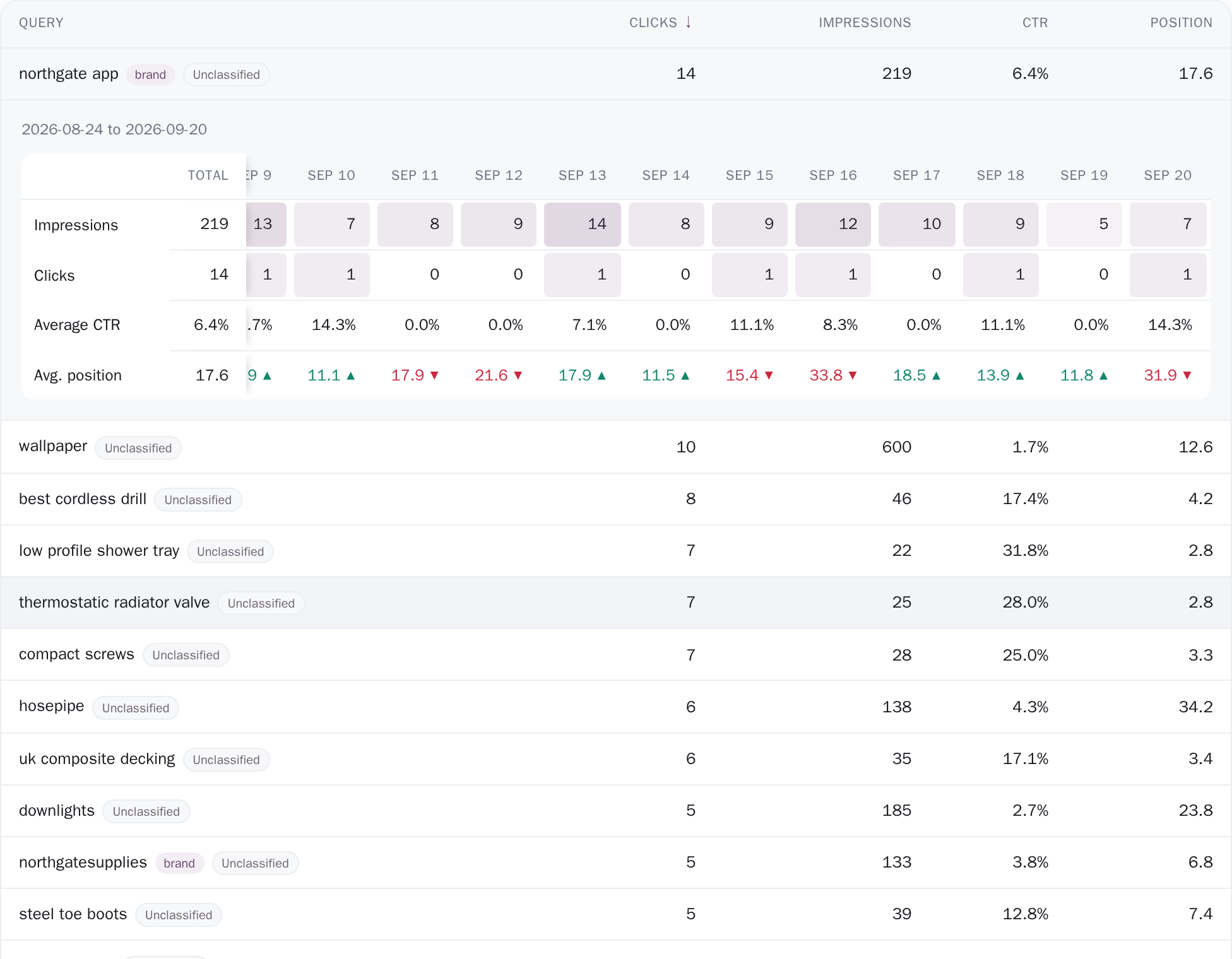
Clicking a row opens a small grid in place: impressions (how many times Google showed you), clicks, average CTR (the share of those views that turned into a click) and average position, laid out across real calendar days, weeks or months, with a Total column pinned at the left, so it stays on screen while the dates scroll away underneath it. Days Google reported nothing are drawn as zeros rather than skipped, because a missing day means nobody saw you, not a day that did not happen.
A week or month that runs past the edge of your window is dimmed and labelled "partial period", with a note underneath, so a half week never sits beside a whole one as though the two were comparable. Each position cell is marked against the column before it with an arrow and a tooltip reading "up 1.4 places · against Aug 12"; anything smaller than a tenth of a place says "no real change" instead.
Flip to pages, then the queries behind one URL
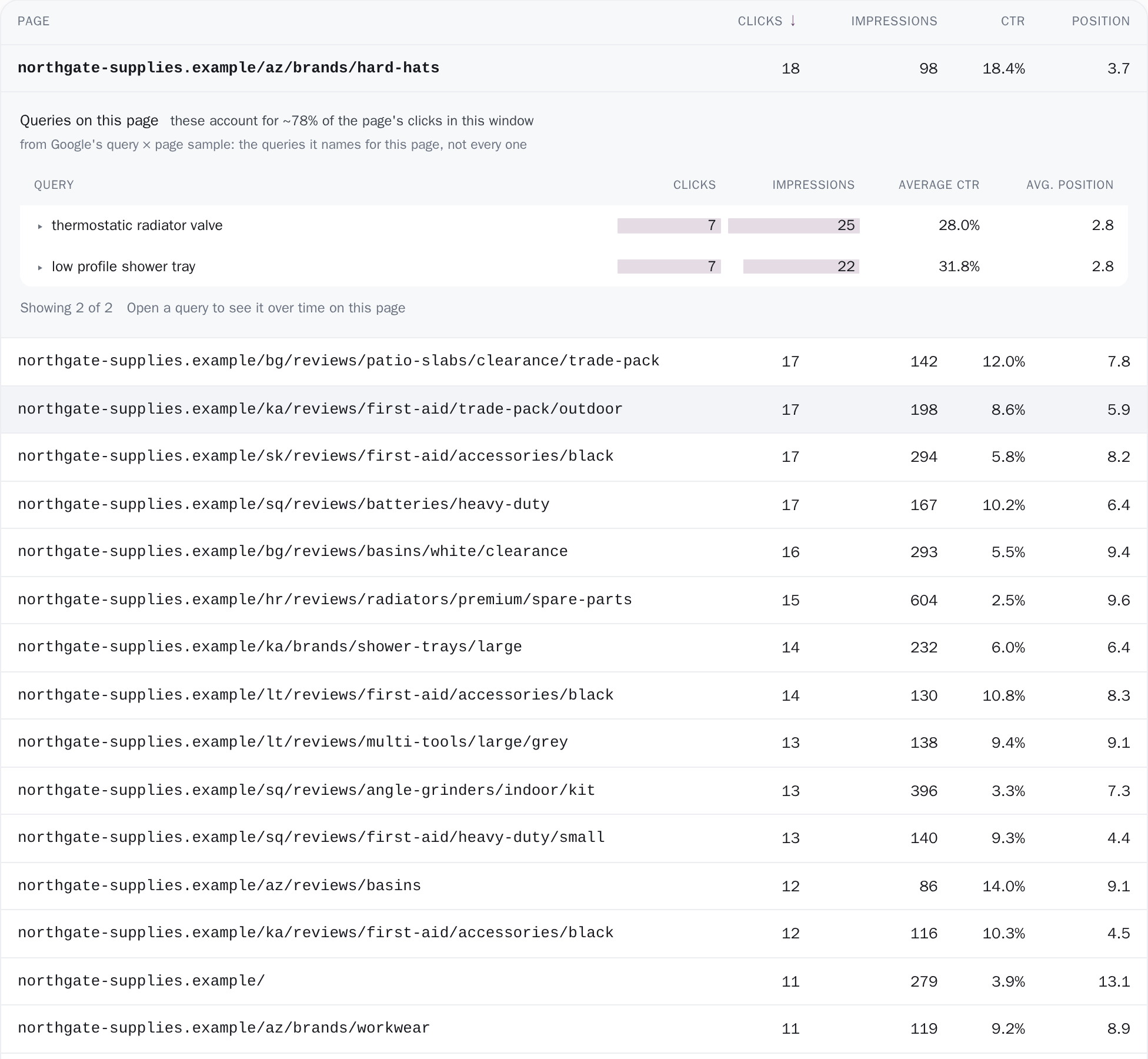
The same table switches to pages over the same window and the same five columns. Open a page and it lists the queries Google names for that URL, ranked, twenty-five at a time, with bars behind clicks and impressions and a Show more button that appends the next twenty-five without closing anything. Directly under the heading is the reason to read the list carefully: "from Google's query × page sample, the queries it names for this page, not every one".
Beside the heading, whenever nothing is segmented and the page has clicks in the window, that caveat is made measurable: "these account for ~37% of the page's clicks in this window", the sample's clicks against the page's own from the raw store. Set a device or a country and the share is left out rather than printed, because both sides would then come from the same sample and the ratio would read near 100% by construction. Open one of those queries and you get the same four-number grid scoped to that keyword on that page; it stops there, two levels deep, on purpose.
Which window, and which half of Google's data
This screen answers over the window in the date picker at the top of the page, the last 28 days unless you change it, and every rolling preset is clamped to the first day you actually have stored, so a window can never claim days that do not exist. Under the count sits one sentence measuring the list against your property's own daily totals for those same days, not against an estimate: "these account for ~21% of clicks and ~60% of impressions in 2026-08-05 to 2026-09-01, and the rest belongs to queries Google anonymizes." Unfiltered, the rows come from the raw per-query daily store, what Search Console returned for each date and query, kept as it arrived.
Set a device or a country and the screen switches to Google's smaller query × page sample, because the raw store carries neither, and the coverage line is replaced rather than quietly dropped: "filtered to Mobile, from Google's query × page sample, so impressions are counted once per page". The Pages tab reads Search Console's per-page pull, which has no anonymized tail, so it prints no coverage caveat and states what it is instead: every page Google served between the two dates of your window.
Where it cannot answer honestly it declines rather than guessing: the coverage percentage disappears the moment a search or an intent or brand chip is active, because, in the code's own words, "with a search or facet active the denominator is no longer the property". Empty states name the population that came up empty: "Google names no queries for this page in this window.", "No stored days for this one yet.", "No pages with impressions in this window yet." And a page you arrived at by deep link that is missing from the table gets told which of the two causes it is, because widening the range and clearing a filter are opposite actions.
Page sizes and cut-offs
Exactly what you are looking at
- The queries Google withholds have a size, and this page puts a number on it. Rare searches that might identify a person are never released through the API to anyone, so a real share of your impressions belongs to searches nobody outside Google can see. This page measures that share against your property’s own daily totals for the same days and prints it, rather than reporting the rest as your total.
- Google caps a single day's query pull at 5,000 rows. The raw store is built one day at a time, so a day that hit the ceiling holds its 5,000 highest-clicking queries and no more. On one 529-day archive, 149 days came back sitting exactly on 5,000. Nothing on the screen repairs that, and the coverage sentence is where you see its effect: the missing rows are part of what the percentage is short by.
- The coverage percentage is printed only where it is true: the unfiltered view. Type in the search box or pick an intent or brand chip and the sentence steps aside, deliberately, because the denominator is no longer your whole property. Set a device or a country and it is replaced by a different disclosure: the numbers then come from Google’s query × page sample, where an impression is counted once per page, so they are not the property’s totals to take a share of.
- Intent and brand labels come from a fixed trailing 90 days, and so does the export. The labels are rebuilt each sync over those 90 days and joined onto whatever window you are viewing, so a query with activity in your window but none in those 90 days arrives with no intent chip and counts as Non-brand. The queries export reads that same 90-day store: its preamble states that window and the coverage percentages rather than letting anyone sum the file and call it site traffic, and says so plainly when the screen was segmented and the file is not.
Connect your site and see the first answer today
Sign in with Google, pick a property, and your dashboard fills in while you watch, with the screen counting the days as they land.