Winners & losers
What gained, what lost, and where we stop guessing
Clicks are down this month and Search Console gives you a total. It does not tell you which twenty pages caused it, or which of the searches it does know about quietly stopped sending anyone at all. Working that out by hand means exporting two periods and lining them up in a spreadsheet, and the answer is usually wrong by the time you have it.
How it works
Two ranked tables, every column sortable
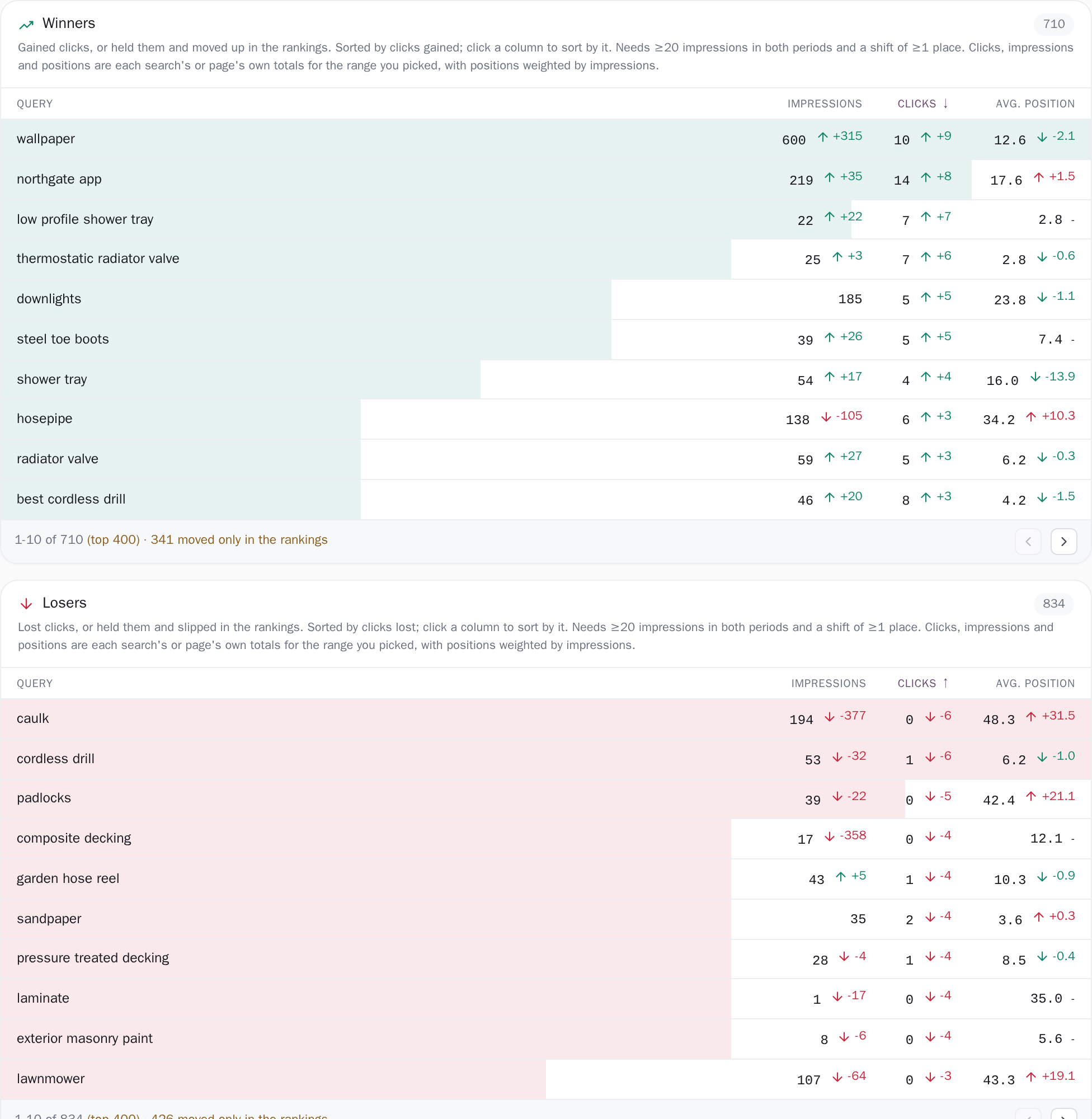
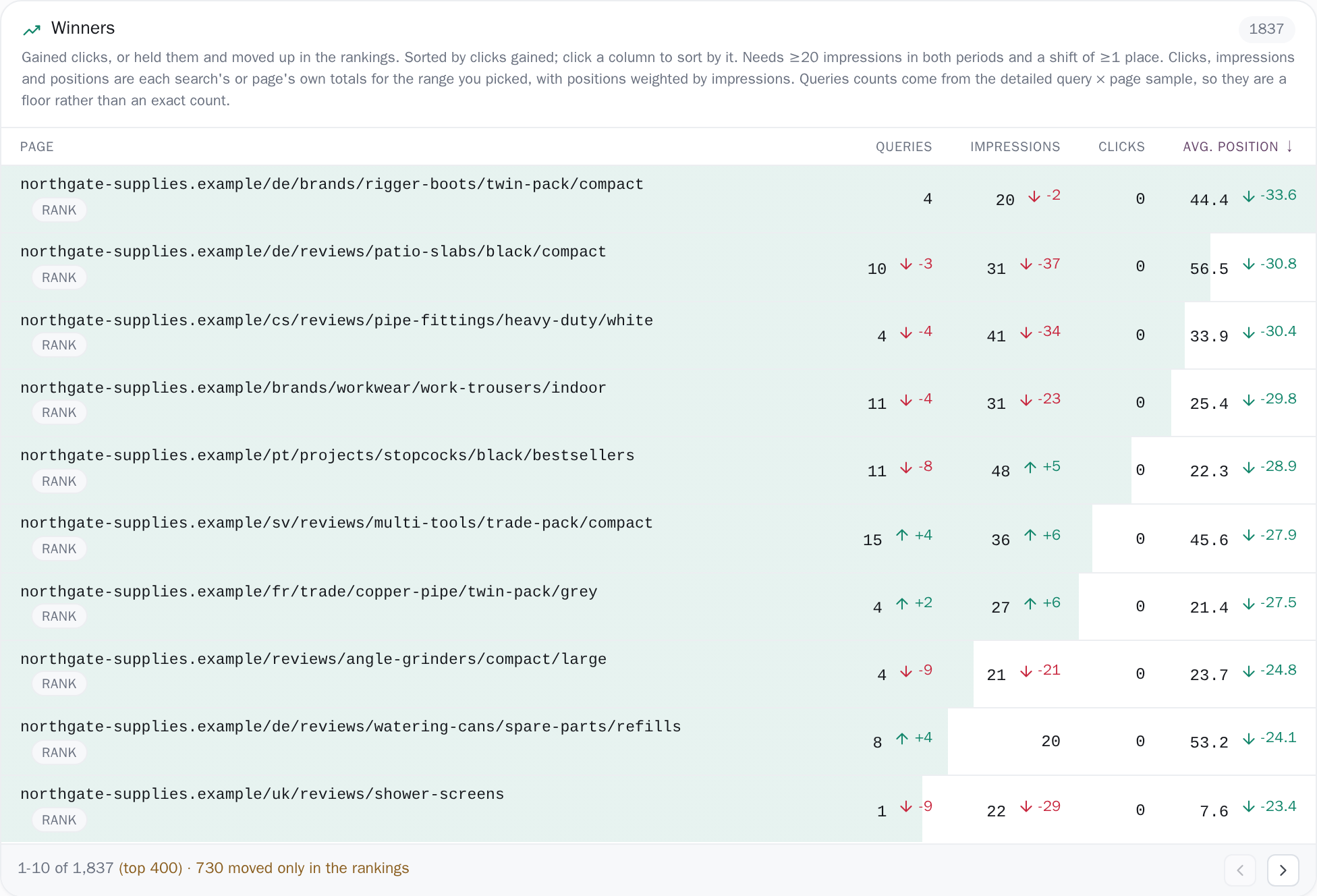
Winners and losers each arrive as one table rather than four separate rankings. Every row carries the search or the page, its impressions (how many times it appeared in Google's results), its clicks and its average position, plus one more column on the Pages tab counting the distinct searches that page ranked for. Each of those cells prints the current figure, with the change beside it wherever the figure actually moved: a row that held its clicks steady shows the bare number, because a +0 chip is not a change.
Click any column heading and that card re-sorts on it (across every row fetched, not just the ten on screen), and the horizontal bar behind each row re-measures itself to match, so the bar and the ordering can never tell two different stories. The winners card states its own rule at the top: "Gained clicks, or held them and moved up in the rankings. Sorted by clicks gained; click a column to sort by it."
The rows that kept their clicks and still moved
A page sliding from 4th to 9th has not lost its clicks yet, and a list ranked only by clicks lost would never show it to you. Those rows are fetched as their own branch of the query so that click movers cannot crowd them out. Sorted in with the rest, every one of them would sit at a click change of zero and fall below the cap. They are tagged rank in the table, with the note "Clicks held steady; this row is here because its ranking moved", and the footer counts them separately: "· 293 moved only in the rankings".
A shift only counts as a shift above 20 impressions in both periods and at least a full place of movement. Below that bar the row still prints its current position, but the change is replaced by a dash whose tooltip gives the reason.
Four tiles read the whole site, not the top four hundred rows
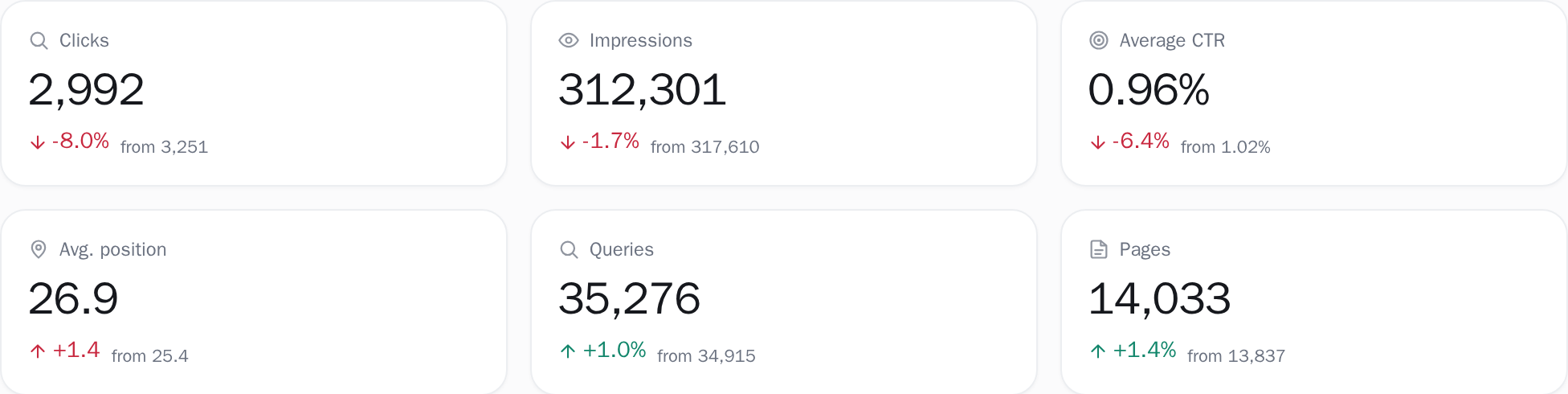
Above the tables sit clicks, impressions, average CTR (clicks divided by impressions) and average position, each with its change and, where a comparable baseline exists, the previous figure printed underneath it. Where none does, the chip reads new and no previous figure is invented to sit under it. Position is weighted by impressions, and its change chip is flipped so that moving from 9th to 4th reads as a gain rather than a fall.
Two further tiles, the number of distinct searches and distinct pages, appear only when the product has actually measured those counts for your range, and carry a small pill whenever the window they cover is not the one you picked, or their baseline is not the one the other four are using; when both match, there is no pill to read. The four main tiles deliberately read your site-wide daily totals rather than the mover rows, because the mover rows are only the few hundred searches or pages that moved most.
A rate computed from a truncated slice of a list is not your site's rate. Reading the same daily series the dashboard reads is also what keeps the two pages agreeing.
You pick both periods; the screen names the ones it used
The date range in the header sets the current period: last 7 or 28 days, last 3, 6 or 16 months, all history, this or last week, month or quarter, or any custom span. The tiles answer for the whole of it. The tables need two windows of equal length inside your stored per-query history, so on a long range (and on a free account, which keeps 14 days) the mover comparison is narrowed to the longest pair that fits, and both windows are printed with their day count.
A Compare to picker sets what the current period is measured against: the previous period, the same period last year, or a baseline you type in yourself. Any baseline other than the previous period is checked against that per-query history and refused for one of three reasons the screen then prints: it overlaps the range you selected, it is a different number of days, or per-query detail does not reach that far back.
A year-ago baseline usually falls outside it, so the tiles honour the year while the tables fall back to the period immediately before, and the line beside the table title says so with its dates. When the tiles and the tables end up covering different windows, each gets its own line; the two are never merged into a single claim.

Which window, and which half of Google's data
Winners and losers answer over the range you pick in the header, or, where your stored per-query history cannot hold two windows that long, over the longest equal pair that fits, with both windows and their day count printed. Either way the comparison runs against a baseline of exactly the same number of days; a baseline that is short or a different length yields new rather than an invented percentage.
The two tables are built from Google's per-query and per-page daily figures, the raw single-dimension pulls, not the sampled five-dimension cube: measured on the sites we develop against, the cube's clicks per query match exactly, but its impressions come to 0.65-0.75 of the true per-query figure and 0.30-0.55 of the true per-page figure, and per-page positions were out by 8 to 13 places.
The tiles above the tables read the site-wide daily totals for the whole selected range, so this page and the dashboard agree; when the tiles and the tables cover different windows, the screen prints two lines instead of one. Where it cannot answer, it says so in the standing footnote at the bottom of every load: "Built from Google's per-query and per-page daily figures for the selected range. Searches Google anonymizes away are absent, and so is the tail of any day where Google returned its 5,000-row maximum for queries. Movers need a period of the same length before the one you picked. Where the history does not reach that far, the comparison uses the longest window that fits and says so."
The thresholds, stated
Exactly what you are looking at
- It needs per-query history on both sides. A range that starts before that history is clamped to it and, when no equal period fits in front, narrowed to the longest pair of equal windows that does. The screen prints both, with the day count and the date the detail starts. A range that ends before the history begins gets the site totals plus a banner that gives the day per-query detail starts and goes on: "so there are no query- or page-level movers for this range. The totals below still cover it in full." And if the window that survives is under two days wide, no tables are drawn at all.
- The distinct query and page tiles are removed, not relabelled, for any range that does not end on the last day of data in your most recent sync: "Distinct query and page counts are only measured for the last 7, 28 and 90 days, so they are not shown for a historical range."
- On the Pages tab the Queries column is a floor, not an exact count, and says so under the rule line. Google's per-page daily figures carry no query dimension at all, so that number can only come from the truncated query × page sample.
- A free project keeps 14 days of daily history, and two equal windows have to fit inside it, so its longest mover comparison is about 7 days however long a range you pick. The tiles still answer for the whole of it. Both plans sync once a day, but Google itself lags two to three days, so the anchor those distinct-count tiles hang on still sits a few days behind today.
Connect your site and see the first answer today
Sign in with Google, pick a property, and your dashboard fills in while you watch, with the screen counting the days as they land.