24 months of history
Google serves 16 months, a thousand rows at a time. You keep 24 months of every page and every search.
One day next spring you will want to know whether this March beat last March, for each page, for each search, day by day. Search Console has the months but not the answer: one total for the whole site, a thousand rows at a time, inside a rolling window of roughly 16 months that lets the oldest day fall off for good. We keep 24 months of the full daily detail (every page and every search, nothing cut to a top list), so the comparison is a question you ask, not a spreadsheet you build.
- Search Console still has this
- Already deleted by Google
- Copied the day you connect
- Added by the daily sync
- Room the archive fills: 24 months
- The day you connect
- Your archive holds back to
- October 2024
- Deeper than Google
- 8 months
Connected 8 months ago, your archive is full at 24 months. From here it moves forward with the calendar: a new month in, the oldest month out.
Drawn for a property Google has held for at least 16 months. A younger property starts with less. A paid project keeps these 24 months; a free project keeps the most recent 14 days.
How it works
On a paid project, your archive starts full and ends up about eight months ahead of Google
The first sync asks Search Console for everything it still serves: 489 days of daily totals, which is sixteen calendar months, plus the per-day rows behind them for each of your pages and each search Google names. Every sync after that adds to the store instead of replacing it, so on a paid project the newest end keeps moving forward while the oldest end settles about eight months behind Google's: the archive holds a rolling 24 months, and the left-hand end of that chart reaches into months Search Console itself no longer serves.
A free project is the other shape. At the end of every sync its history is trimmed back to the most recent 14 days, so it forgets faster than Google does, and the limits below say exactly what that costs and what stops it. Either way the header tells you where you stand without opening anything: a pill reading "Synced 2h ago" over "Fresh to Aug 25", which turns amber and reads "Data to" with that date once the newest day is more than four days old.
One date picker, and it reaches as far back as you really have
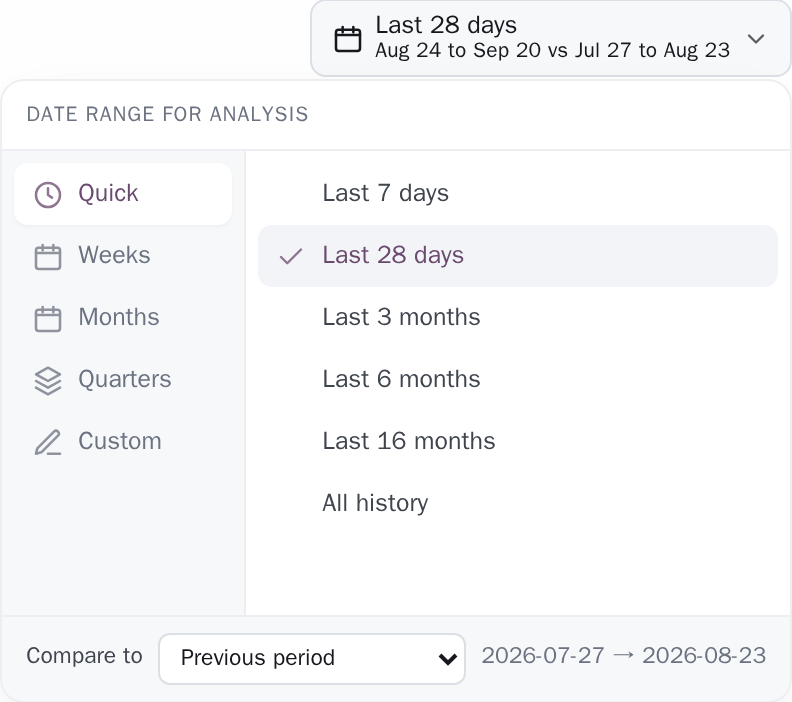
There is exactly one date control on the screen, in the header, and every dated block below reads it. No block has a second date box of its own. It opens on five tabs: Quick (Last 7 days, Last 28 days, Last 3 months, Last 6 months, Last 16 months, All history), Weeks, Months, Quarters and Custom. The Weeks, Months and Quarters lists are built from your first stored day rather than from a fixed count, and they stop where your archive stops, so a 24-month archive can be read month by month all the way to the bottom, and every period the panel offers is one you actually hold days for.
Their own ceilings sit further out than a 24-month archive ever reaches: 156 weeks, 36 months, 16 quarters, which is three years of weeks, three years of months and four years of quarters. Whichever comes first, your floor or that ceiling, is where the list ends. The Custom tab states its bounds in words, "Any span from" your first stored day to your last, and its two date fields refuse a day outside them.
Compare with last year, not only with last week
At the foot of the same panel is Compare to: Previous period (the default), Same period last year, or a baseline you type yourself. It is stored separately from the range, so changing the range keeps the baseline you chose rather than silently resetting it, and the second line under the button always prints both windows in dates: "29 Jul to 25 Aug vs 31 Jul to 27 Aug 2025 · Same period last year".
The baseline has to be exactly as long as the range and start inside the archive. Where it starts too early the picker greys its dates to "no data that far back", with the reason on hover: the tooltip gives the day the archive starts and says "there is no complete period before this one. Metrics will read 'new' instead of a change." Where it is merely the wrong length (a hand-picked June against July, 30 days against 31) the comparison is dropped instead, and the tile says which of the three reasons applies rather than blaming the archive for a length problem.
That whole rule exists because of a real miss: on a 497-day archive, "Last 16 months" once compared 480 days against the 17 that happened to precede them and printed +3,930% in green for a site whose clicks were falling.

A range in the past is computed, not looked up
History is kept day by day and never rolled into monthly summaries, which is what lets an old window be answered properly instead of approximately. The Pages and Queries tiles are a count of distinct pages and distinct searches over the exact dates you picked, run twice, once for the range and once for the baseline, so a window sitting entirely in the past answers as readily as a trailing one.
Keyword band movement is worked out the same way, from stored per-day impression-weighted positions (a search's average position over a window, weighted by how many times it was shown each day), so the block answers the range you chose rather than snapping it to the nearest of 7, 28 or 90 days as it once did. Your own dated notes travel with the archive too, so a spike from last year still carries "Migration to the new shop" beside it, alongside Google algorithm updates added by an administrator and shown on every project.
Which window, and which half of Google's data
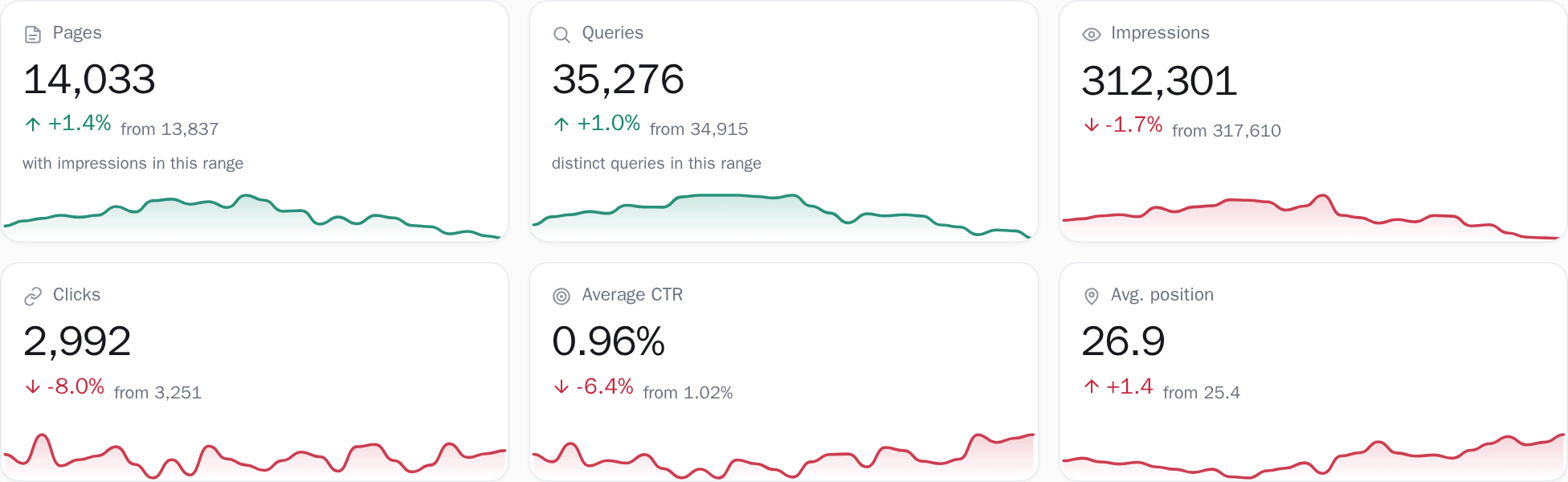
Every dated block on the dashboard reads the one header picker, and each one that has something to draw states in words which dates it actually measured; a block with no data for the range drops out rather than printing a figure it cannot stand behind. Two blocks are deliberately not dated by the picker and say so where it matters: the sitemap side of page coverage is always its latest read, and drop alerts are computed by each sync rather than for the window you are looking at. The daily totals come from Search Console's per-date pull, which is complete rather than sampled, and are added to a store that runs about eight months deeper than Google's own window; those totals are clicks, impressions (the times one of your pages appeared in a result Google served), click-through rate and average position.
Page and query counts come from the per-day page and query pulls; the query side carries Google's own ceiling of 5,000 rows for a single day, and where a day in your window hit it the screen labels the counts "a floor, not a total" rather than passing them off as whole. The detailed query × page cube is a different source again.
It is impression-sampled (about 6% of impressions on one measured property) while carrying close to all of the clicks, which is why the brand and intent split is computed on clicks only; and unlike the rest of the archive that cube is rolled forward to Google's own window on every sync, so the split reaches back sixteen months rather than as far as your history does.
It captions itself with the clicks it covers out of all clicks, the dates of the detailed window and the share those clicks make, then: "The shares below are of that part, not of all traffic." When your range reaches further back than a block's records, the block measures what it holds and says so on the tile, naming the two dates it could measure between "because records reach no further back", with an amber pill giving the number of days it was shortened to, which appears only when the block could not honour the range; a block that honoured it simply names the dates it used.
When nothing overlaps at all it prints "no stored days overlap this range" instead of a zero, a missing comparison renders as "new" with a tooltip naming which of three reasons applies, and the trend chart names its own cause: Search Console does not serve that metric this far back, and the chart gives the day it starts.
What is pulled, kept and compared
Exactly what you are looking at
- The archive starts at whatever Search Console still served on your first sync: roughly sixteen months, and less for a property Google has held for less time. That first sync is what sets the floor, so month eighteen belongs to the account that was already syncing back when sixteen months was all Google had. Connect a property before you need the depth, and the depth is waiting when you do.
- A paid archive holds a rolling 24 months, about eight months deeper than Search Console itself goes: a nightly sweep drops everything past that depth, so an archive that has filled the window reaches eight months further back than Google will still serve, and no further. A free archive holds the most recent 14 days, trimmed at the end of every sync. The daily totals and the raw per-day page and query rows are trimmed together, so the chart, the page counts and the keyword counts cannot disagree about how far back your site goes. The same 14-day trim reaches a paid archive once the account stops paying (when a subscription ends, only after a 3-month grace period), and paying is what holds the window open at 24 months.
- Google's ceiling of 5,000 rows for one day's query pull applies to the past exactly as it does to today. That is the ceiling of the API this archive is filled through; the export button in Search Console's own interface stops sooner, at 1,000 rows, which is the thousand at the top of this page. The long tail of a busy day was never reported to anyone, and no amount of storage recovers it. The screen counts how many days in your window hit the ceiling and calls those counts a floor.
- Two of these numbers are dated differently from the rest, and both say so on screen. The brand and intent split is drawn from the detailed query × page cube, which is kept for Google’s own rolling window, so it answers about 16 months against the archive’s 24. The sitemap is a live read rather than a series: the page-coverage block reconciles against the latest one and says so in as many words, “We keep no history of your sitemap, so this side is always its latest read.” A sitemap that could not be read blanks its numbers to dashes rather than printing zeros.
Keep reading
Google is deleting your search data, one day at a time
Google permanently deletes Search Console data older than about 16 months. What that costs, why the BigQuery export cannot fix the past, and your options.
Read the guideAsk for a month in one request and some of the days come back a fraction full
A month of Search Console query data in one request is ranked by clicks across the whole range, then cut. Some days come back a fraction full, and nothing errors.
Read the postConnect your site and see the first answer today
Sign in with Google, pick a property, and your dashboard fills in while you watch, with the screen counting the days as they land.