Drop alerts
Four checks run after every sync. You read one sentence.
Nobody opens an analytics tool on the day something breaks. You open it three weeks later, notice the line is lower than you remember, and then lose an afternoon working out when it started. The checking is the part that has to happen without you, so it runs at the end of every sync, and whatever it finds is waiting at the top of the project's dashboard as a sentence with both numbers in it.
How it works
Four checks, each with a floor underneath it
At the end of every sync the app compares the most recent seven days on record against the seven before them, four times over: clicks; average position (how high up the results page you sat, averaged across every time you were shown, so the searches shown most often count for most); the number of keywords sitting in the top ten; and the number of your pages that earned at least one impression, meaning one appearance in somebody's search results.
Every check has a volume floor beneath it, so no rule can fire off a base too small to mean anything: a site that had four clicks last week and one this week has lost 75%, and nothing is written. No number is computed when you open the page. The figures were written by the sync and are read back exactly as they were; the card only groups them by kind and works out how long ago each was written.
And because the sync stamps every alert with the last day of data it describes, a later sync that sees the same newest day writes nothing new: one row per project, per check, per window of data.
One row per ongoing problem, not one per night
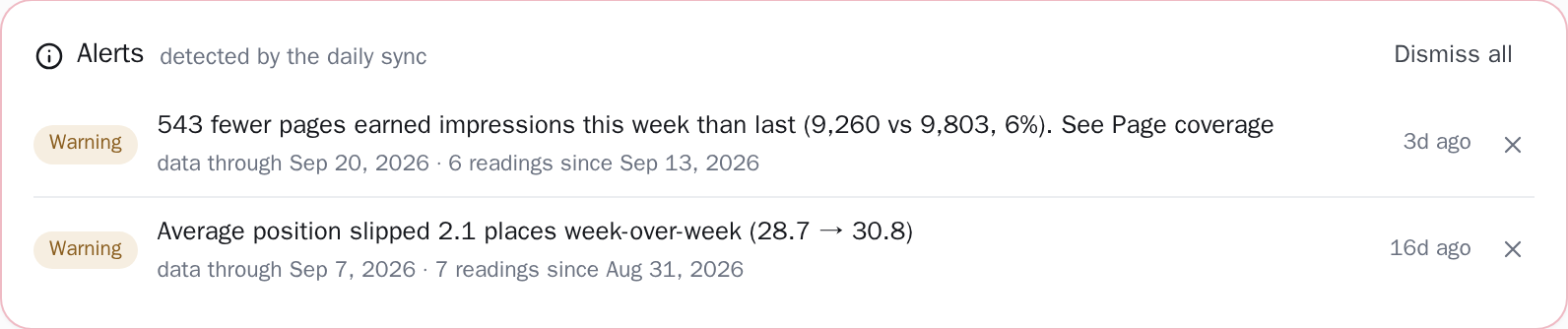
A drop that lasts nine days used to arrive as nine near-identical rows, an event log rather than a briefing. Unseen alerts of the same kind are now collapsed into a single row: the newest reading, a Critical or Warning chip, and a line reading "4 readings, 12 Aug → 15 Aug · latest: 1,240 → 890 over 7 days" (those two dates are the days the readings were written), with the individual readings one click away, each carrying its own age.
The before-and-after pair on that row is always the newest reading's own two numbers, measured over one seven-day window; pairing the oldest row's "before" with the newest row's "after" would print two totals eleven days apart as though they were one comparison, which is exactly what the line used to do. What stops the run growing a row a night is a stamp the sync writes and never shows you: the last day of data each reading covers.
Search Console publishes two to three days late on a lag that is not constant, so consecutive syncs regularly see the same newest day. The second one recognises the window it already reported and adds nothing.
The wording is the product, not a red triangle
Every drop alert is a sentence carrying its own arithmetic: "Average position slipped 3.4 places week-over-week (from 12.1 to 15.5)", or "43 fewer pages earned impressions this week than last (1,204 vs 1,247, 3%). See Page coverage". Where the measurement cannot support a claim, the sentence stops short of making it: that pages check knows how many fewer pages earned impressions, but the two counts it compares do not carry a list of which ones, so it gives the number and points you at Page coverage instead of naming pages it cannot name.
The same card carries the notice when a sync itself fails. Those carry no figures at all. They are sorted rather than pasted: a revoked Google connection reads "Google Search Console needs to be reconnected. Reconnect it in Settings and the next sync will pick up everything it missed" and is Critical, while a Google rate limit reads "Nothing is lost. The next sync will catch up" and is only a Warning.
The raw error text is never shown on your dashboard: the card prints the sentence and nothing else, and the original message goes to the admin log where it belongs. When a later sync succeeds, the failure notice clears itself. An unread Critical describing something that was fixed a month ago is furniture, and it is the reason the next real one would not be read.
Where it turns up, and who can clear it
The card is not a permanent fixture: it exists only while something is unseen and disappears when the last row is cleared, so seeing it at all means something. Across projects, the projects list carries the unread count on each row as a badge, a plain "3", with "3 unseen alerts: open the dashboard" on hover. Once the list holds two projects or more, an Alerts tile totals every unseen row across every project you can open, including sites shared with you by someone else, captioned either "unseen: open the flagged projects" or "nothing unseen".
Dismissing a grouped row clears every reading in that run at once, because clearing one line of a nine-line run only brings the rest back tomorrow; Dismiss all marks every unseen row on the project seen, including any beyond the thirty the card lists. Clearing is per project rather than per person: a teammate who dismisses a row dismisses it for everyone, and a view-only teammate cannot dismiss it at all. The server refuses that request, and the row is back on the next reload.

Which window, and which half of Google's data
The window is fixed, and it is not the date-range picker at the top of the dashboard: every alert compares the most recent seven days on record against the seven days before them. Clicks and average position come from the property's day-by-day totals, the figures Google reports for the whole site with no per-search sampling in them, so those two rules see everything.
The top-ten count is a dedicated pull of your searches for each of the two weeks, both sides measured by the same kind of pull rather than one side borrowed from another measurement; the page count is a dedicated, complete pull of the pages that earned impressions in each week, not the sampled coverage list. On one of the sites we develop against, that list held 0.18% of the week's impressions and once produced a Critical alert whose denominator was short by 10,577 pages.
Only two of the four rules test for a complete week: the clicks and position checks are skipped rather than compared against a part-week, so with fewer than seven days on either side they do not run at all. The top-ten and pages checks read a fixed pair of seven-day windows anchored on the newest day of data, and what holds them back on thin data is their volume floor.
Every alert also carries the last day of data it describes (stored for the de-duplication key, not printed on the row), so Search Console's uneven two-to-three-day publishing delay cannot turn one event into two. And when more than thirty rows are waiting, the card says which ones you are looking at: "detected by the daily sync · newest 30 of 47".
The thresholds, stated
Exactly what you are looking at
- Alerts are read where the evidence is. They appear on the project's dashboard, directly under the page title and above the charts and tables that explain the drop, so the numbers to check sit one scroll below the sentence that flagged them.
-
The check runs when a sync runs, and a sync runs once a day. The rules only run at the end of a sync, on a free project exactly as on a paid one, so a drop can be a day old before anything is written, on top of the two to three days Search Console takes to publish the data at all.
Sync nowcloses that gap by hand, once every three hours. - Four rules, the same on every project. Every threshold is fixed in the code rather than tuned per site, so a Critical chip means the same thing on Tuesday as it meant on Monday, and the same thing on your site as on anyone else's. Each rule has a Warning level, a Critical level and a volume floor the data has to clear before either can fire; all of them are listed under “The thresholds, stated”.
- You clear the row, not the finding. Clearing marks it seen for the whole project, and the card hides itself again once the last row is gone, so anything still on screen is something nobody has dealt with yet. The numbers behind the row stay where they were, on the dashboard and in the reports, for as long as the archive holds that history (a rolling 24 months on a paid plan, the last 14 days on free). If the drop lasts, the next sync writes a fresh row for it once the seven days it measures have moved clear of the reading you cleared, and sooner than that if it has crossed into Critical.
Run your own week through the four checks
Change any number. Each row applies the threshold and the floor stated above, the arithmetic the app runs at the end of a sync, and the sentence underneath is the one it would write.
| Check | Last week | This week | What gets written |
|---|---|---|---|
| Clicks | Warning−28% | ||
| Average position | Warning3.4 places lower | ||
| Impressions, the floor under position | Floor met | ||
| Keywords in the top 10 | Nothing−18% | ||
| Pages earning impressions | Warning−531 (−5%) |
The sentence on the dashboard card
- WarningClicks down 28% week-over-week (from 1,240 to 890)
- WarningAverage position slipped 3.4 places week-over-week (from 12.1 to 15.5)
- Warning531 fewer pages earned impressions this week than last (9,722 vs 10,253, 5%). See Page coverage
Related guides
Why did my Google traffic drop?
Search traffic fell and you don't know why. Work through it in order: is it real, is it seasonal, is it one section or all of them, and what each answer means.
Read the guideGoogle Search Console, for people who did not want to learn SEO
Search Console for a small business site: what it is, how to set it up, the four numbers that matter, and what to actually do about them.
Read the guideConnect your site and see the first answer today
Sign in with Google, pick a property, and your dashboard fills in while you watch, with the screen counting the days as they land.