Cannibalization
See which page to keep when two of yours compete
You wrote a service page. Two years later somebody added a blog post about the same thing. Now Google shows sometimes one and sometimes the other, and the impressions for that search arrive divided between them instead of landing on one page. Nothing goes missing from your totals, which is exactly why a report that adds your pages together will never show you this.
How it works
Four tests before a query counts as a conflict
Two of your pages showing up for one search is normal, and most of the time it is harmless. It matters only when neither page wins. So a query has to earn its place on this list, by passing four tests set out in full under “The thresholds, stated”: enough of your pages appeared for it, they drew enough impressions between them (an impression is one appearance in the results), no single page won outright, and the top two carried a real share between them.
Everything is judged inside one language, and pages in different languages are never set against each other: the same word served by /en/ and /de/ is Google picking a locale, not a conflict. The four conditions together took one 30-language site from 201 flagged queries down to 66 while the rule was being built; cross-locale pairs alone accounted for roughly 65% of that naive 201.
Open a row and it names the page to keep
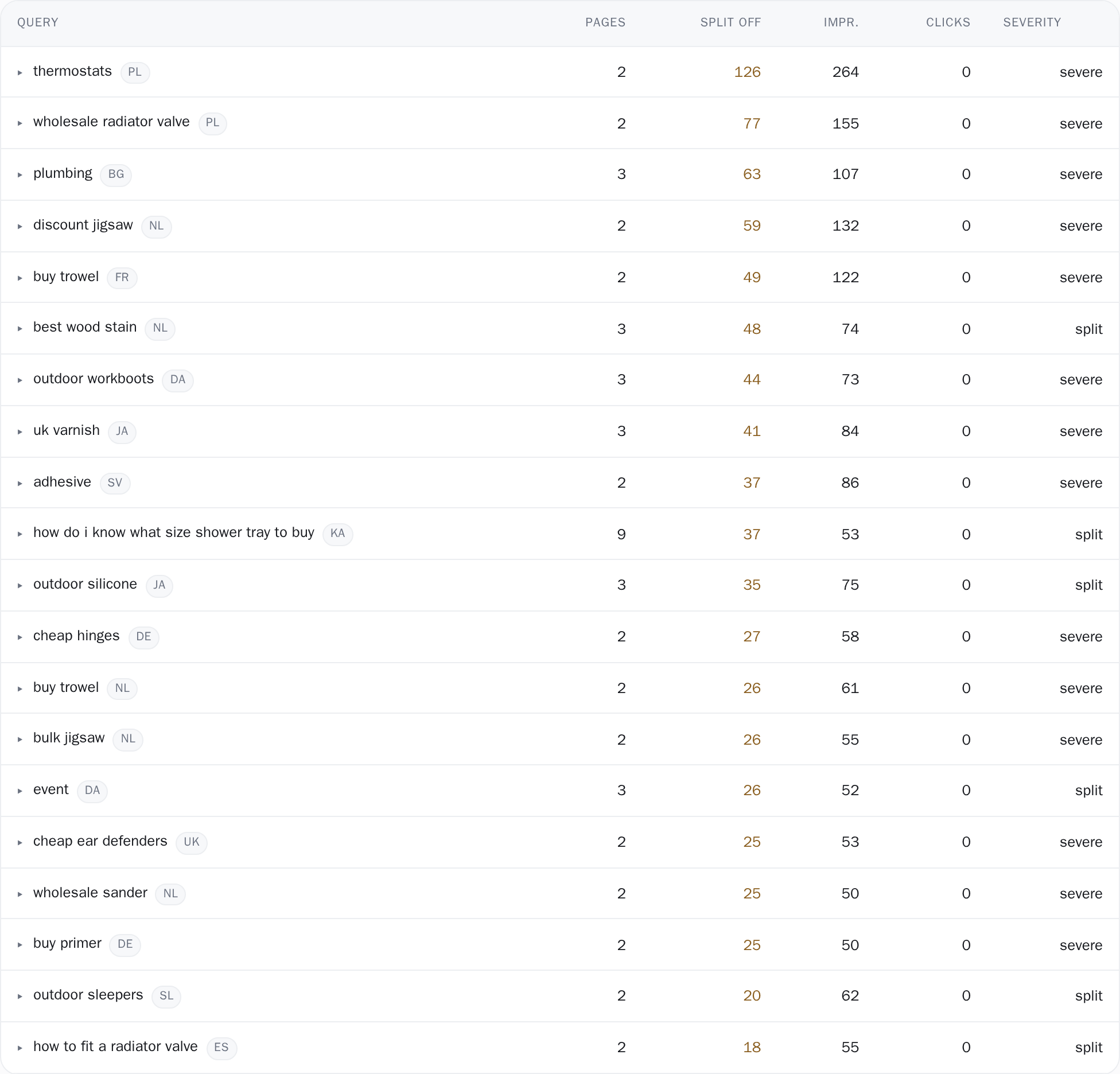
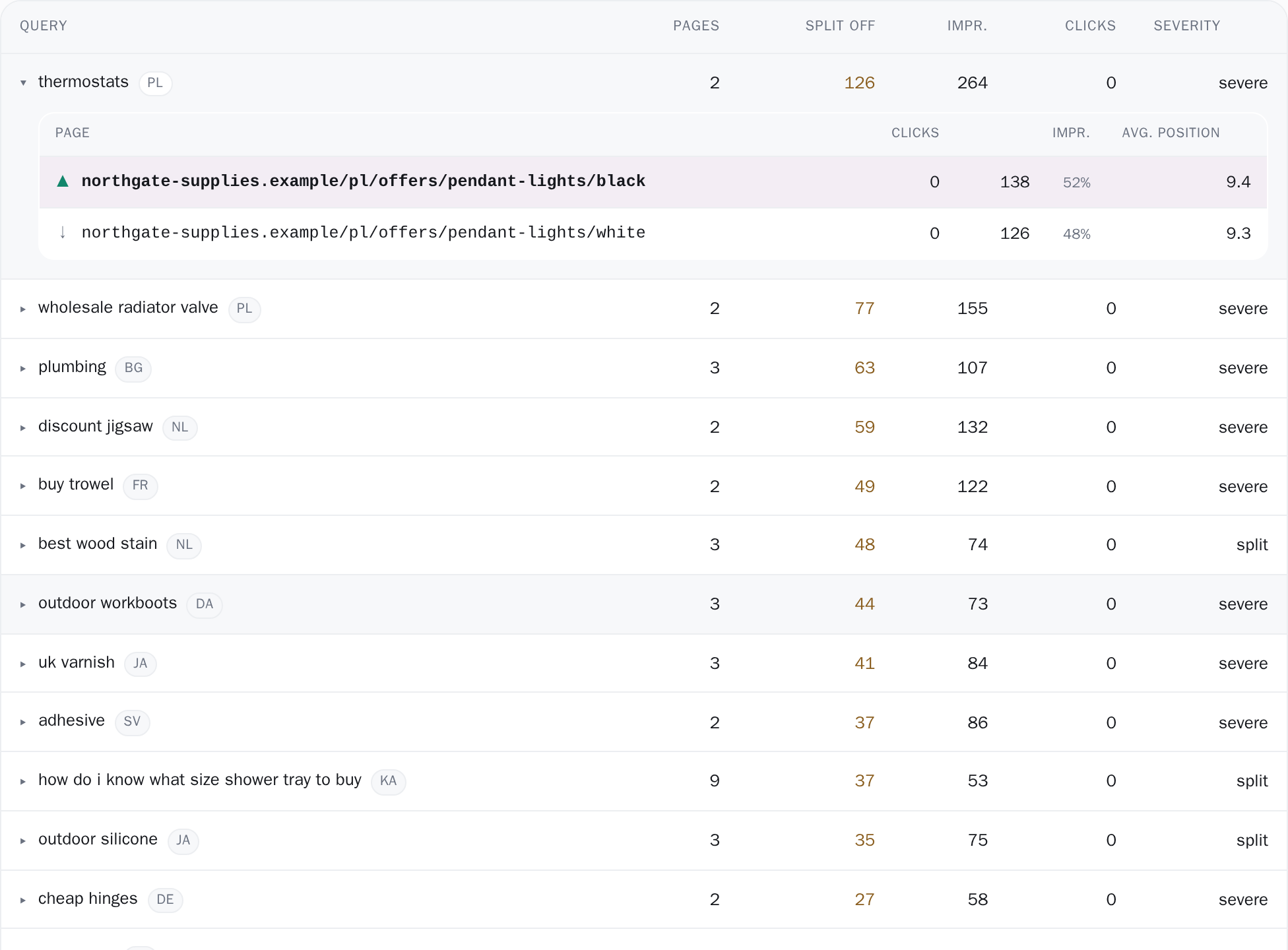
A closed row is a summary: the query with its language chip, how many pages are involved, the impressions split off, the totals and a severity chip. Click it, or press Enter or Space, and it opens into the pages themselves: the path, its clicks, its impressions with its share of the query as a percentage, and its average position across those impressions (impression-weighted, with a dash where there were none).
The first page is highlighted and marked with a ▲ carrying the tooltip "Best performer: consolidate onto this one"; every other page gets a down arrow and "Also ranking for this query". Best there means the page holding the most impressions in this data, so read the clicks column beside it before you merge anything. Rows stay open when you open the next one, so two findings can be read side by side, and a copy button on each page (shown on hover, always visible on touch) puts the full address on the clipboard.
Four numbers, counted over every finding
Above the table sit Queries splitting, Impressions split off, Pages involved and Impressions at stake. The second one is amber, and the line under it gives the share of these queries' impressions that land off the best page. All four are counted over every qualifying finding (one query in one language) and not over the 200 in the table, so the headline figure never shrinks to the size of the list.
A term that splits in both /en/ and /de/ is two findings and is counted twice. The table below is ranked by impressions split off rather than by raw volume, so the work worth doing is at the top: impressions split off is what lands on pages other than the best one, which is what consolidating could win back. The strip disappears entirely when there is nothing to report.

The file names its window and its cap
The CSV button writes out the list you are currently looking at, search and severity filters included: one line per competing page, with the query, its language, the page, a Best performer yes/no column, clicks, impressions, share of the query's impressions, average position, split off and severity. Above the column headers it writes the window it measured over, and, if the list was capped, a line like # 200 of 431 affected queries, the biggest by impressions split off, because a spreadsheet carrying neither of those lines gets forwarded to a client as the whole picture.
The file is a CSV built in your browser from the rows on screen, so it holds at most the 200 findings the list shows, and its header says when the list was capped.
Which window, and which half of Google's data
This screen reads the detailed query × page rows we store from Search Console (the same rows the Performance report shows when you break a single query down by page) and not the property totals. Those two are not the same size, so a bar sits directly under the title, above every number, stating the days actually covered: "Measured over Jun 1, 2026 - Aug 31, 2026." Those dates are the range you picked trimmed to the stored detail's own extent, so the bar can be narrower than your pick but never wider.
When it is narrower it says which it is, naming the dates and then "the detailed-data window, narrower than the range you picked." Under the table a second line discloses the sample as a floor, with both raw numbers. On one of the sites we develop against it read: "Counts here come from Google's detailed query × page data, which accounts for at least 6% of this window's impressions (96.6k of 1612k). Which pages split a query is reliable; the impression totals are the sample's, not the site's." Unrounded, that is 96,639 impressions of 1,611,613.
When the page cannot answer, it says which kind of cannot. A range with nothing wrong in it reads "No cannibalization detected" / "Every query with enough impressions in this window resolves to one page." A range the detailed data does not reach reads "Not measured here" and prints the dates it can cover, taken straight from that stored extent: "Not measured for this range. The query × page detail we store covers Jun 1, 2026 to Aug 31, 2026. Pick a range inside it." A project that has not finished its first sync gets a third sentence of its own: "No detailed query × page data stored for this project yet. This page fills in after the first complete sync."
The thresholds, stated
total impressions − the best page's impressions), then by total impressions, then by an internal query id, a total order on purpose, so the same range asked twice returns the same list in the same order.Exactly what you are looking at
-
Language is read from the first path segment of the URL (
/en/,/de/), and only same-language pages are compared. That cuts both ways. A site that separates its languages by subdomain or by country domain instead is treated as one language, so its locale pairs are compared as though they competed, while a page at the root carries no code at all and is never compared with a page under/en/./de/and/de-at/count as two languages, and a two-letter section that is not a locale (/it/,/uk/) is read as one. - The list stops at 200 findings for a range. The search box and the severity buttons filter the rows already loaded rather than asking the server again, so on a site over that cap you are filtering the biggest 200, not the whole set. The CSV, built from those same rows, inherits the ceiling.
- The impression and click totals belong to Google's detailed sample, not to your site. Which pages split a query is reliable, the absolute numbers are not, and the page named best is the one holding the most impressions in that sample, not necessarily the one earning the most clicks. The page prints its own coverage percentage rather than letting you assume otherwise.
- It answers one window at a time. Findings are ordered by impressions split off and stay in that order, because the ranking is the recommendation: the top row is the query worth consolidating first. The header's comparison baseline belongs to the screens that measure two periods against each other; here, the bar under the title names the days this answer actually covers. To see how a split stood in an earlier month, set the range to those dates and ask again, as far back as the stored detail reaches.
Connect your site and see the first answer today
Sign in with Google, pick a property, and your dashboard fills in while you watch, with the screen counting the days as they land.