AI assistants
Ask Claude or ChatGPT about your search traffic, and get answers you can check
Connect Clode to the AI assistant you already use, once, then ask it what you would ask a colleague who knows SEO: which pages lost clicks this month, which searches are close to the first page, whether two of your pages compete for one search. It takes the answer from your data in Clode, read-only, and every answer says which dates it covers and which of Google's data it came from, so you can check it.
Which pages lost the most clicks in the last 28 days?
It asks Clode: what fell, by page, on northgate.example
Three pages account for most of the fall:
| Page | Clicks | Before |
|---|---|---|
| /emergency-electrician/ | 41 | 77 |
| /fuse-box-repair/ | 18 | 39 |
| /ev-charger-installation/ | 12 | 25 |
How it works
Connect it once, in one step
In your assistant's settings, add a custom connector with Clode's address, https://clode.org/mcp. The assistant opens a Clode page: you sign in, choose which sites it may read and press Allow read-only access. There is nothing to install and no code to add to your site. An app that cannot open that page, a script on a server for example, uses an access key instead.
You create one on the AI assistants page in your account menu: it is shown once, it stops by itself after 30, 90 or 365 days, and you can have up to 10.
What it can read
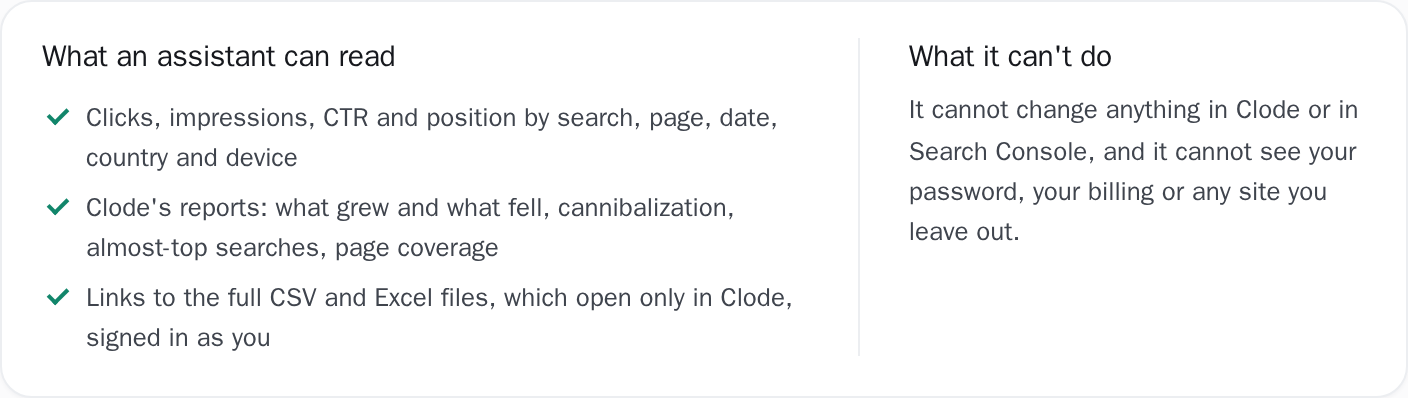
The same stored data your dashboard and reports are drawn from: clicks, impressions, CTR and position by search, page, date, country and device. Clode's own reports come with it: what grew and what fell against the period before, cannibalization, searches close to the first page, and page coverage. When a list is too long to read in a chat, the assistant hands you a link to the full CSV or Excel file instead. The link opens only in Clode, signed in as you, so a chat you forward to someone else opens nothing for them.
Every answer names its dates and its source
An assistant fills a gap with a confident guess, so Clode leaves it no gap to fill. Every answer comes with a label the assistant can read back to you: the dates it covers, which end on the last day Google has published rather than on today; the period it was compared with, or why no fair comparison was possible; whether the figures are your site's complete daily totals, Google's per-page rows, or its per-search rows, which leave the anonymized searches out; and, for a list of searches or pages, how much of the site's clicks the list holds.
A comparison is made only when the whole earlier period is stored, a change from zero is reported as new rather than as a percentage, and positions are never added up or averaged across pages.
You choose the sites, and you can disconnect it
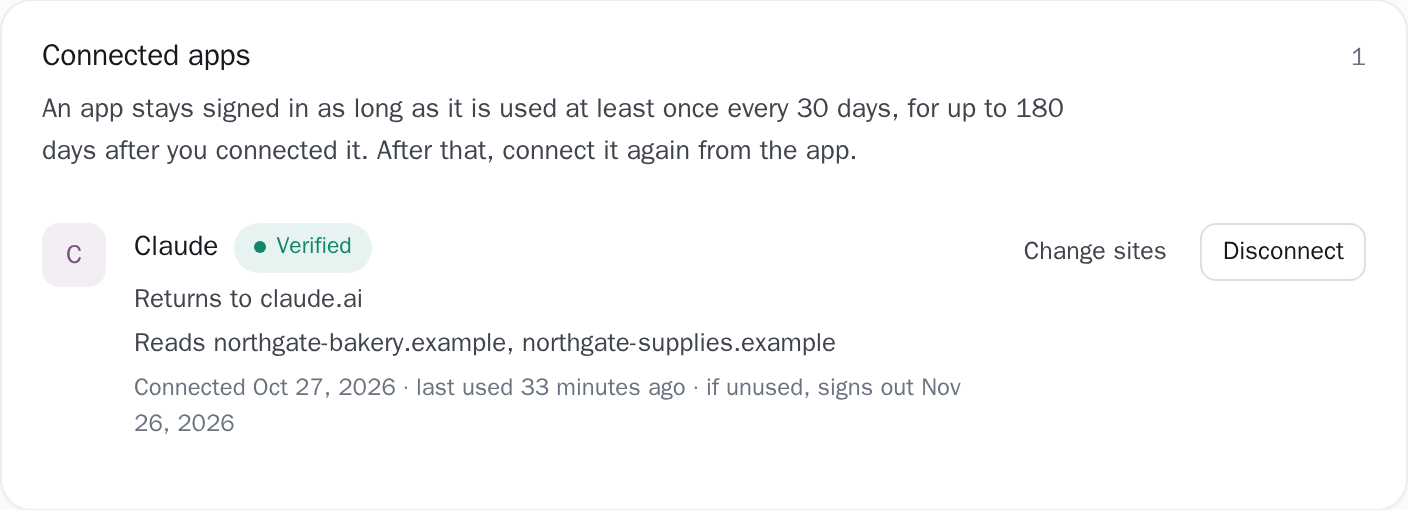
On the Clode page that opens, you choose all your paid sites, including ones you add later, or only the sites you tick. Sites other people shared with you are left out unless you include them, and a site on the free plan cannot be chosen. Every connection is listed on the AI assistants page with when it was last used, and Disconnect stops it at the assistant's very next request.
Changing or resetting your password, or turning on two-step verification, disconnects every assistant at once, and a connection also ends by itself after 180 days. Clode emails you each time an assistant is connected or a key is created.
What the assistant is reading
The assistant reads what Clode has already stored for your sites: the same rows your dashboard and reports are drawn from, and nothing fetched from Google especially for it. It reads them over a connection the database itself keeps read-only, so no request can change a row, and a request that would run longer than 20 seconds is stopped and answered with a suggestion to ask for fewer days.
Periods end on the site's last day of data, which is two to three days behind today because that is when Google publishes. Site totals are Google's complete daily figures. A list of searches comes from Google's per-search rows, which leave out the searches Google anonymizes and stop at 5,000 rows a day, so it holds only part of the site's clicks, and each answer says how much.
A list of pages comes from Google's per-page rows, which do include the anonymized searches but count impressions once for every page shown: a search that showed two of your pages counts on both, so page impressions can add up to more than the site total. Every answer names which of these its figures came from. A comparison is made only when the earlier period is stored in full, so a property Google itself has held for only a few weeks gets no month-on-month figure, and the answer says why instead of comparing against a half-empty month.
Figures come rounded once, from unrounded sums: CTR as a percentage to two places and position to one, and a site-wide position comes only from the daily totals, never from adding up pages. A long list comes back a page at a time, which the assistant can ask for in turn; past 1,000 rows it is pointed at the CSV or Excel file, which holds every row.
The thresholds, stated
Exactly what you are looking at
- It can only read. Nothing in the connector changes anything: not your sites, not your settings in Clode, not Search Console. It cannot see your password, your billing or a site you did not choose.
- A site on the free plan cannot be read. AI assistants come with the paid plan, and the plan that counts is that of the account the site belongs to: on a site someone shared with you, their plan decides. The assistant sees the site's name and that it is on the free plan, so it can tell you why, and nothing else about it.
- When a paid plan ends, assistants stop reading its sites that same day. A card subscription that ends keeps the full history for 3 months, and paying again within them lets assistants read all of it again; after that only the last 14 days are kept. A crypto period has no such wait: history older than 14 days is deleted the day it ends. Ending a plan closes no connection, but an app that goes 30 days without being used signs out of Clode, on any plan, and has to be connected again.
- Google's own limits still apply. Search Console names at most 5,000 searches a day and keeps the rarest ones anonymous, so the assistant meets the same floor the Queries screen does, and the answer says so.
- An assistant can misread a number. It gets every figure with its dates and its source, but the sentence it writes is its own. Before you act on something that matters, open the same report in Clode and check it.
- Clode never sees your conversation. Only the assistant's request for data reaches us: which report, which site, which dates, and any filter it adds, such as a search term or a page address, which may be words it took from your chat. Clode keeps a record that it happened for 30 days but not what it asked for, except that a download link keeps the report and filters it was made for until it expires. What the assistant's provider keeps of your chat is set by its own terms.
- Which plans can add a connector is up to each provider. Custom connectors are not on every Claude or ChatGPT plan, and the list changes. If you do not see the option in your assistant's settings, your plan may not include it.
Connect your site and see the first answer today
Start on the free plan to see your own data in Clode, and move to the paid plan when you want an assistant to read it.